Getting Started with Client SDKs: A Beginner’s Guide for Python, TS, Go, Java & More
Focus keyword: Getting Started with Client SDKs
If you’re building automation workflows, integrating APIs, or connecting services, you’ve probably heard developers mention “SDKs.” But what exactly is a client SDK, and how do you actually use one? This beginner-friendly guide will show you what SDKs are, why they make your life easier, and how to get started with client SDKs across seven popular programming languages: Python, TypeScript, Go, Java, Ruby, PHP, and C#.
By the end of this tutorial, you’ll understand the basic pattern for using any SDK and have working examples to reference when you start your next automation project.
Previous Tutorial :
Tutorial 1 : Getting Started with Claude – Understanding Models & Pricing
What is a Client SDK? (SDK Overview for Beginners)
An SDK (Software Development Kit) is a pre-built library that wraps an API and makes it easier to use in your code. Instead of manually crafting HTTP requests, handling authentication headers, parsing JSON responses, and dealing with error codes, an SDK does the heavy lifting for you.
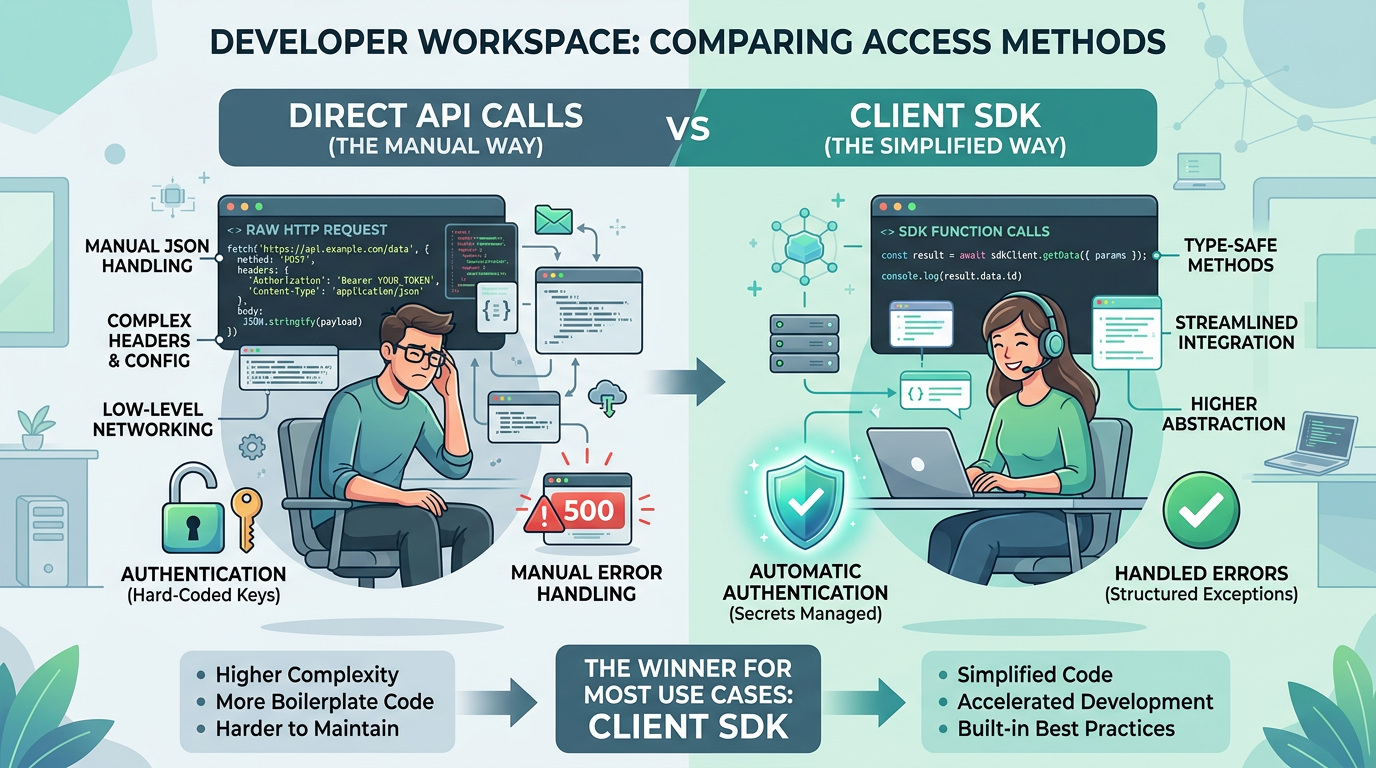
Think of it this way: you could build a table from raw lumber, or you could buy a kit with pre-cut pieces and instructions. An SDK is the kit—it gives you ready-to-use functions that abstract away the complexity of direct API calls.
Key difference from an API: An API is the raw interface (usually REST endpoints). An SDK is a language-specific package that talks to that API for you, with built-in error handling, type safety, and convenience methods.
Why Use an SDK Instead of Direct API Calls?
When you use an SDK, you get several benefits:
- Less boilerplate code: No need to write headers, construct URLs, or serialize/deserialize JSON manually
- Better error messages: SDKs translate HTTP status codes into meaningful exceptions or error objects
- Type safety and autocomplete: Your IDE can suggest methods and catch mistakes before runtime
- Authentication handling: Most SDKs manage tokens, API keys, and session refresh automatically
- Documented patterns: Official SDKs come with examples and best practices
The trade-off is an additional dependency and a small learning curve for each SDK’s conventions—but for most projects, the time saved is well worth it.
Who This Tutorial Is For
This guide is designed for:
- Developers who want a quick overview of SDK patterns across multiple languages
- No-code builders using tools like n8n who need to understand when to use SDK-based code nodes vs. pre-built integrations
- Tech-savvy beginners starting their first automation project and encountering SDK documentation for the first time
You should have basic familiarity with at least one programming language and understand how to run commands in a terminal.
Prerequisites: What You Need Before Installing Any SDK
For the latest official details, see consult the official installation documentation for your chosen language.
Before you can install and use an SDK, make sure you have:
- A programming language runtime installed (Python 3.8+, Node.js 16+, Go 1.18+, Java 11+, Ruby 2.7+, PHP 7.4+, or .NET 6+)
- The corresponding package manager (pip, npm, go, Maven/Gradle, gem, Composer, or dotnet CLI)
- API credentials for the service you want to use (API key, OAuth token, or service account)
- A text editor or IDE (VSCode, IntelliJ, PyCharm, or similar)
If you’re missing any runtime or package manager, consult the official installation documentation for your chosen language before continuing. Because setup methods and version requirements can change, always check the latest official documentation for the specific SDK you plan to use.
The Basic SDK Usage Pattern
Nearly every SDK follows this five-step pattern:
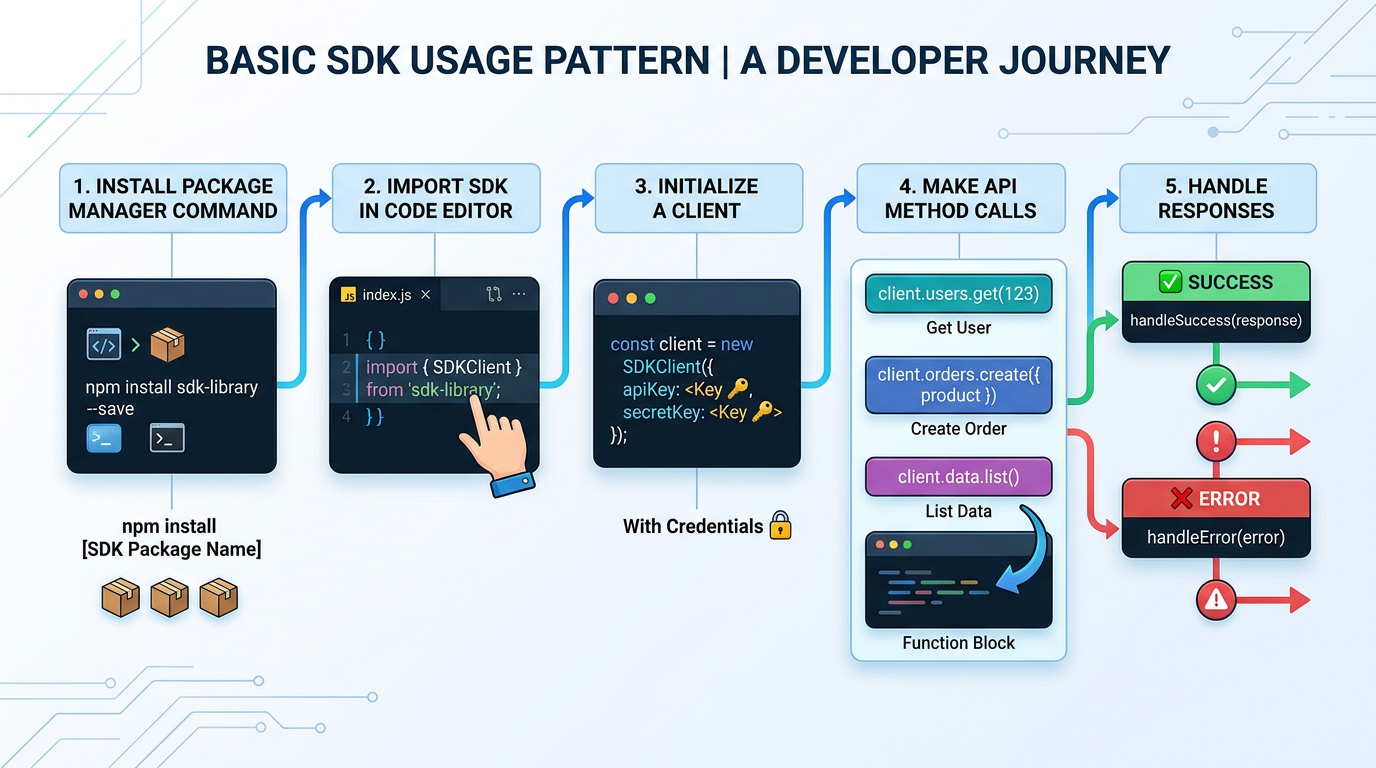
- Install the SDK package using your language’s package manager
- Import the SDK into your code
- Initialize the client, usually with configuration or credentials
- Call methods to interact with the API (fetch data, create resources, etc.)
- Handle responses and errors appropriately
Let’s see how this looks across different languages.
Python SDK Tutorial: Complete Walkthrough
For the latest official details, see upgrade pip to ensure you have the latest package manager.

Python is one of the most accessible languages for beginners, so we’ll use it for a detailed example. Let’s walk through installing a hypothetical SDK and making your first API call.
Step 1: Install the SDK
First, upgrade pip to ensure you have the latest package manager:
python -m pip install --upgrade pipThen install the SDK (replace example-sdk with the actual package name from the official documentation):
pip install example-sdkFor real projects, track your dependencies in a requirements.txt file and install them with:
pip install -r requirements.txtStep 2: Set Up Authentication Securely
Never hardcode API keys in your code. Instead, use environment variables. Create a .env file in your project directory:
API_KEY=your_api_key_hereInstall a library to load environment variables:
pip install python-dotenvStep 3: Write Your First SDK Call
Here’s a complete example that initializes a client and makes an API call:
import os
from dotenv import load_dotenv
from example_sdk import Client

# Load environment variables
load_dotenv()

# Initialize the client
api_key = os.getenv("API_KEY")
client = Client(api_key=api_key)

# Make an API call with error handling
try:
    response = client.get_user(user_id="12345")
    print(f"User name: {response.name}")
    print(f"Email: {response.email}")
except client.exceptions.AuthenticationError as e:
    print(f"Authentication failed: {e}")
except client.exceptions.RateLimitError as e:
    print(f"Rate limit exceeded: {e}")
except Exception as e:
    print(f"Unexpected error: {e}")
What’s Happening Here?
- Line 1-3: Import the necessary modules
- Line 6: Load environment variables from
.env - Line 9-10: Get the API key securely and initialize the client
- Line 13-15: Call the SDK method and use the response
- Line 16-21: Handle different error types gracefully
Notice how the SDK handles authentication headers, JSON parsing, and type conversion automatically. You don’t see any raw HTTP requests—that’s the power of an SDK.
How to Use TypeScript SDK: Installation and Setup
TypeScript and JavaScript SDKs use npm (or yarn/pnpm) for package management. Here’s the basic pattern:
Installation
npm install example-sdk
# or with yarn
yarn add example-sdk
Basic Usage
import { Client } from 'example-sdk';
import * as dotenv from 'dotenv';

dotenv.config();

const client = new Client({
  apiKey: process.env.API_KEY
});

async function getUser() {
  try {
    const user = await client.users.get('12345');
    console.log(`User name: ${user.name}`);
  } catch (error) {
    if (error.status === 401) {
      console.error('Authentication failed');
    } else {
      console.error('Error:', error.message);
    }
  }
}

getUser();
TypeScript SDKs often use async/await patterns for cleaner asynchronous code. The structure mirrors the Python example: import, initialize, call, handle errors.
Install Ruby SDK Step by Step
Ruby uses RubyGems and Bundler for package management:
Installation
gem install example-sdkFor projects with a Gemfile:
# Gemfile
gem 'example-sdk'
Then run:
bundle installBasic Usage
require 'example_sdk'

client = ExampleSDK::Client.new(
  api_key: ENV['API_KEY']
)

begin
  user = client.get_user('12345')
  puts "User name: #{user.name}"
rescue ExampleSDK::AuthenticationError => e
  puts "Authentication failed: #{e.message}"
rescue StandardError => e
  puts "Error: #{e.message}"
end
Java Client SDK Example
Java SDKs typically use Maven or Gradle for dependency management.
Maven Installation (pom.xml)
<dependency>
    <groupId>com.example</groupId>
    <artifactId>example-sdk</artifactId>
    <version>1.0.0</version>
</dependency>
Basic Usage
import com.example.sdk.Client;
import com.example.sdk.models.User;

public class Example {
    public static void main(String[] args) {
        String apiKey = System.getenv("API_KEY");
        Client client = new Client(apiKey);

        try {
            User user = client.getUser("12345");
            System.out.println("User name: " + user.getName());
        } catch (AuthenticationException e) {
            System.err.println("Authentication failed: " + e.getMessage());
        }
    }
}
Quick Reference: Go, PHP, and C#
Go SDK Installation
go get github.com/example/example-sdk-goPHP SDK with Composer
composer require example/sdkC# SDK with NuGet
dotnet add package ExampleSDKEach language follows the same mental model: install the package, import it, initialize a client with credentials, call methods, and handle errors. The syntax changes, but the pattern remains consistent.
Common Beginner Mistakes and How to Avoid Them
Hardcoding Credentials
Problem: Putting API keys directly in code exposes them in version control. Solution: Always use environment variables or secure configuration files listed in .gitignore.
Ignoring Error Handling
Problem: First API calls often fail due to authentication, network issues, or rate limits. Solution: Wrap SDK calls in try-catch blocks and log error messages to understand what went wrong.
Installing the Wrong Version
Problem: Using outdated SDK versions can cause compatibility issues. Solution: Check the official documentation for recommended versions and update regularly.
Skipping Prerequisites
Problem: Trying to install an SDK before installing the language runtime or package manager. Solution: Verify your environment with commands like python --version, node --version, or go version before installing SDKs.
Not Reading the Documentation
Problem: Guessing method names or parameter formats instead of consulting official docs. Solution: Bookmark the official SDK reference and read the quickstart guide before coding.
Troubleshooting Your First SDK Installation
For the latest official details, see Verify the SDK installed correctly with pip show package-name.
If you encounter errors, here’s how to debug:
Import or Module Not Found Errors:
- Verify the SDK installed correctly with
pip show package-name(Python) ornpm list package-name(Node) - Check that you’re using the correct import name (package names and import names sometimes differ)
- For Python, ensure you’re in the correct virtual environment
Authentication Errors:
- Double-check your API key is correctly set in environment variables
- Verify the API key has the necessary permissions
- Check if the service requires additional setup (OAuth flow, account verification, etc.)
Network or Connection Errors:
- Test your internet connection
- Check if the API has regional restrictions or is temporarily down
- Review rate limits or usage quotas that might block requests
Version Compatibility Issues:
- Compare your language version with the SDK’s minimum requirements
- Try upgrading the SDK to the latest version
- Look for breaking changes in the official changelog
FAQ
Do I need to understand the underlying API to use an SDK? Not completely, but understanding the basics (what endpoints exist, rate limits, authentication methods) helps when things go wrong or when you need features not yet in the SDK.
Can I use multiple SDKs in the same project? Yes! Many automation workflows combine multiple services. Just manage dependencies carefully and watch for naming conflicts.
Should I use the official SDK or a community library? Official SDKs are maintained by the service provider, ensuring compatibility and up-to-date features. Use them when available.
What if there’s no SDK for my language? You can make direct API calls using HTTP libraries like requests (Python), axios (JavaScript), or net/http (Go). It’s more work, but perfectly viable.
How do I know when to use an SDK vs. a no-code tool like n8n? Use n8n’s pre-built nodes for simple integrations. Use SDKs in custom code nodes when you need complex logic, data transformation, or features not yet supported by built-in integrations.
Next Steps: Deepen Your SDK Knowledge
Now that you understand the fundamentals of getting started with client SDKs, here’s how to continue learning:
- Pick one SDK for a service you want to use and work through its official quickstart guide
- Build a small automation project that combines SDK calls with business logic (e.g., daily summary email, data sync, notification bot)
- Learn async patterns for your language to handle multiple API calls efficiently
- Explore advanced SDK features like pagination, webhooks, streaming responses, and batch operations
- Study error handling strategies like exponential backoff for rate limits and circuit breakers for failing services
Remember, every SDK you learn makes the next one easier—the pattern stays the same, only the syntax changes. Start with one language you’re comfortable with, get a working example running, and build from there.
Getting started with client SDKs opens the door to powerful automation workflows that would be tedious to build with raw API calls. Whether you’re scripting in Python, building web apps in TypeScript, or integrating services in n8n, SDKs will become an essential tool in your development toolkit.
Enjoyed this article?