
SDK Error Handling: A Practical Guide to Retries, Timeouts, and Exceptions
Focus keyword: SDK error handling
Every developer has been there: your code works perfectly during testing, but in production, API calls randomly fail. Network hiccups happen. Services get overloaded. Rate limits kick in. Without proper SDK error handling, these inevitable failures crash your application or leave users staring at cryptic error messages.
This tutorial will teach you how to implement production-ready error handling for SDK and API integrations. You’ll learn when and how to retry failed requests, configure timeouts properly, and handle different types of exceptions gracefully. By the end, you’ll have working code examples you can adapt to any SDK you’re using.
▶Previous tutorial : Claude Code CLI Installation: A Beginner’s Step-by-Step Guide to Running Claude CLI
Who This Tutorial Is For
This guide is written for developers, no-code builders, and tech-savvy beginners who are integrating SDKs or APIs into their applications. You should have basic programming knowledge in Python or JavaScript, and some experience making API calls. If you’ve ever wondered why your API integration works inconsistently or how to prevent your application from hanging when a service is down, this tutorial is for you.
Understanding SDK Error Handling: Why It Matters
SDK error handling is the practice of anticipating, detecting, and recovering from failures when your code communicates with external services. Without it, a single network blip can crash your entire application.

Consider this common scenario: you’re building an automation workflow that calls the OpenAI API to generate content. The API call fails because of a temporary network issue. Without error handling, your workflow stops immediately. With proper error handling, your code retries the request automatically and succeeds on the second attempt—your users never even know there was a problem.
Types of Errors You’ll Encounter
Not all errors are created equal. Understanding the difference helps you decide which errors to retry and which to fail immediately:
Transient errors are temporary failures that often succeed if you try again:
- Network timeouts and connection failures
- HTTP 429 (rate limiting)
- HTTP 500, 502, 503, 504 (server errors)
- Service temporarily unavailable
Permanent errors won’t succeed no matter how many times you retry:
- HTTP 400 (bad request)
- HTTP 401 (authentication failure)
- HTTP 403 (permission denied)
- HTTP 404 (resource not found)
The golden rule: retry transient errors, fail fast on permanent errors.
SDK Retry Patterns Tutorial: Building Robust Retry Logic
For the latest official details, see Retry strategy in the AWS SDK for JavaScript v2.
For the latest official details, see standard/adaptive retry modes and default attempt counts.
For the latest official details, see retry behavior – AWS SDKs and Tools.
Many modern SDKs include built-in retry mechanisms, but it’s important to understand how they work and when you need to implement your own.
What SDKs Do Automatically
AWS SDKs, for example, automatically retry transient errors and throttling responses. The standard retry mode across AWS SDKs defaults to a maximum of three attempts unless you explicitly configure a different value. AWS retry behavior uses exponential backoff with token buckets to prevent overwhelming services, and retries can stop early if retry quotas are exhausted.
However, not all SDKs are this sophisticated. Basic HTTP clients like Python’s Requests library or JavaScript’s Fetch API require you to implement retry logic yourself.
Implementing Basic Retry Logic
Here’s a simple retry implementation in Python:
import time
import requests

def api_call_with_retry(url, max_attempts=3):
    for attempt in range(max_attempts):
        try:
            response = requests.get(url, timeout=10)
            response.raise_for_status()
            return response.json()
        except requests.exceptions.RequestException as e:
            print(f"Attempt {attempt + 1} failed: {e}")
            if attempt == max_attempts - 1:
                raise
            time.sleep(2)  # Wait before retrying
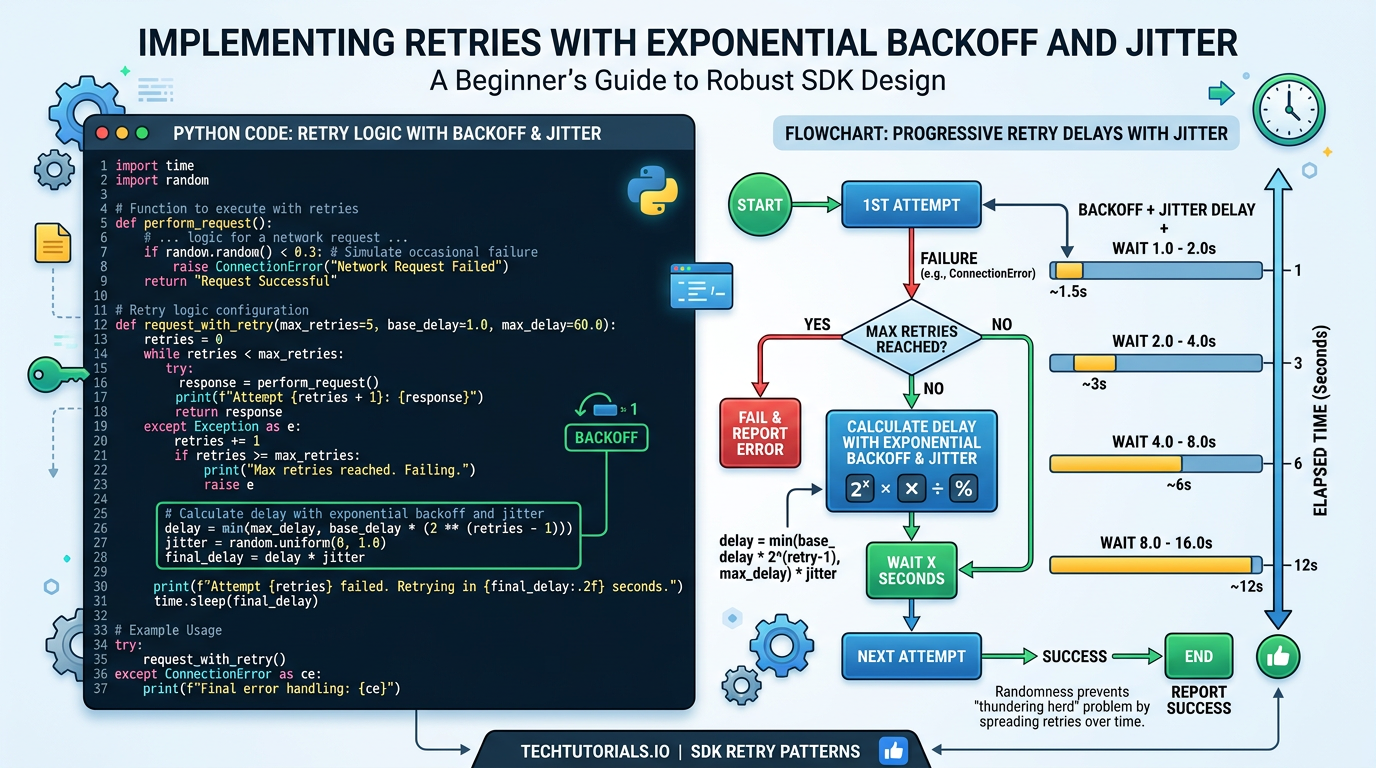
This works, but it has problems. A fixed 2-second delay between retries can overwhelm APIs if many clients retry simultaneously (called the “thundering herd” problem).
Adding Exponential Backoff
Exponential backoff increases the delay between each retry attempt, giving services time to recover. Here’s the improved version:
import time
import random
import requests

def api_call_with_backoff(url, max_attempts=3):
    for attempt in range(max_attempts):
        try:
            response = requests.get(url, timeout=10)
            response.raise_for_status()
            return response.json()
        except requests.exceptions.RequestException as e:
            if attempt == max_attempts - 1:
                raise

            # Exponential backoff with jitter
            base_delay = 2 ** attempt  # 1, 2, 4 seconds
            jitter = random.uniform(0, 1)  # Add randomness
            delay = base_delay + jitter

            print(f"Attempt {attempt + 1} failed. Retrying in {delay:.2f}s...")
            time.sleep(delay)
The exponential backoff formula calculates delay as 2^attempt, so retry delays grow from 1 second to 2 seconds to 4 seconds. Adding jitter (random variation) prevents multiple clients from retrying at exactly the same moment.
API Timeouts Best Practices: Preventing Hanging Requests
For the latest official details, see Retries and Timeouts – AWS SDK for Go v2.

Timeouts are critical but often overlooked. Without timeouts, your application can hang indefinitely waiting for a response that never comes.
Connection Timeout vs Read Timeout
There are two types of timeouts you need to understand:
Connection timeout controls how long to wait when establishing a connection to the server. Set this relatively short (2-5 seconds) because connection establishment should be quick.
Read timeout controls how long to wait for the server to send a response after the connection is established. Set this based on how long you expect the operation to take—some API operations legitimately take longer than others.
Configuring Timeouts in Practice
Python Requests library:
import requests

try:
    # Timeout tuple: (connection_timeout, read_timeout)
    response = requests.get(
        'https://api.example.com/data',
        timeout=(3, 10)  # 3s connection, 10s read
    )
except requests.exceptions.Timeout:
    print("Request timed out")
except requests.exceptions.ConnectionError:
    print("Failed to connect")
JavaScript with Axios:
const axios = require('axios');

axios.get('https://api.example.com/data', {
    timeout: 10000  // 10 seconds total
})
.catch(error => {
    if (error.code === 'ECONNABORTED') {
        console.log('Request timed out');
    }
});
Before implementing timeout configurations in your specific SDK, check the latest official documentation because syntax and default behavior vary across libraries and versions.
Handling SDK Exceptions: Responding to Different Error Types
Different errors require different responses. Here’s how to handle specific scenarios:
import requests

def smart_api_call(url):
    try:
        response = requests.get(url, timeout=(3, 10))
        response.raise_for_status()
        return response.json()

    except requests.exceptions.Timeout:
        print("Request timed out - retry with backoff")
        # Implement retry logic here

    except requests.exceptions.ConnectionError:
        print("Network connection failed - retry with backoff")
        # Implement retry logic here

    except requests.exceptions.HTTPError as e:
        if e.response.status_code == 429:
            # Rate limited - check Retry-After header
            retry_after = e.response.headers.get('Retry-After', 60)
            print(f"Rate limited. Wait {retry_after} seconds")
            # Wait and retry

        elif 500 <= e.response.status_code < 600:
            # Server error - retry with backoff
            print("Server error - will retry")

        elif 400 <= e.response.status_code < 500:
            # Client error - don't retry
            print(f"Client error {e.response.status_code} - fix request")
            raise
Note that rate limit headers like Retry-After, X-RateLimit-Reset, and similar timing information vary by API provider, so always consult your specific API’s documentation to confirm header names and formats.
Timeout Strategies for APIs: Production-Ready Template
Here’s a complete, production-ready function combining everything we’ve covered:
import time
import random
import requests
from typing import Optional, Dict, Any

def robust_api_call(
    url: str,
    max_attempts: int = 3,
    connection_timeout: int = 3,
    read_timeout: int = 10
) -> Optional[Dict[Any, Any]]:
    """
    Make an API call with retry logic, exponential backoff, and timeout handling.
    """
    for attempt in range(max_attempts):
        try:
            response = requests.get(
                url,
                timeout=(connection_timeout, read_timeout)
            )
            response.raise_for_status()
            return response.json()

        except requests.exceptions.Timeout as e:
            print(f"Timeout on attempt {attempt + 1}")

        except requests.exceptions.ConnectionError as e:
            print(f"Connection failed on attempt {attempt + 1}")

        except requests.exceptions.HTTPError as e:
            status = e.response.status_code

            # Don't retry client errors (except rate limiting)
            if 400 <= status < 500 and status != 429:
                print(f"Client error {status} - not retrying")
                raise

            # Handle rate limiting
            if status == 429:
                retry_after = int(e.response.headers.get('Retry-After', 60))
                print(f"Rate limited. Waiting {retry_after}s")
                time.sleep(retry_after)
                continue

        # If we get here, retry with exponential backoff
        if attempt < max_attempts - 1:
            base_delay = 2 ** attempt
            jitter = random.uniform(0, 1)
            delay = base_delay + jitter
            print(f"Retrying in {delay:.2f}s...")
            time.sleep(delay)

    print(f"Failed after {max_attempts} attempts")
    return None
You can adapt this template to any SDK by changing the HTTP client library and adjusting the exception types.
Common Beginner Mistakes to Avoid
Not setting timeouts at all. This is the most common mistake. Always set explicit timeouts—never rely on defaults or infinite waits.
Retrying non-retryable errors. Don’t retry authentication failures (401) or bad requests (400). Fix the request instead.
Not limiting retry attempts. Always set a maximum number of retries to prevent infinite loops.
Ignoring idempotency. When retrying POST, PUT, or PATCH requests, make sure duplicate requests won’t cause problems. Use idempotency keys if your API supports them (many payment APIs like Stripe require this).
Missing logs. Always log retry attempts and final failures. Without logs, debugging production issues becomes nearly impossible.
Using the same timeout for all operations. Quick endpoint lookups need shorter timeouts (2-5 seconds) than file uploads or complex processing (30+ seconds).
Frequently Asked Questions
Do all SDKs handle retries automatically? No. AWS SDKs have sophisticated built-in retry mechanisms with exponential backoff, but many basic HTTP clients require manual implementation. Always check your SDK’s official documentation.
How many retries should I configure? Three attempts (initial attempt plus two retries) is a common default that balances reliability and performance. AWS SDKs default to three attempts in standard retry mode. Adjust based on your service’s reliability and tolerance for latency.
Should I use a library for retry logic? For production applications, consider using established libraries. Python has urllib3.util.Retry that integrates with Requests, and JavaScript has libraries like axios-retry. These handle edge cases you might miss in custom implementations.
How do I test error handling code? Create mock services that simulate failures, use testing libraries to raise specific exceptions, or use network debugging tools to simulate timeouts and connection failures. Testing error paths is just as important as testing happy paths.
What’s a circuit breaker and when do I need one? A circuit breaker prevents your application from repeatedly calling a service that’s clearly down. After a threshold of consecutive failures, the circuit “opens” and fast-fails requests without trying, giving the downstream service time to recover. You need this pattern when calling services that might experience extended outages. Before implementing your own, check if your SDK or framework provides circuit breaker functionality.
Next Steps: Building Reliable Integrations
You now understand the core principles of SDK error handling: retry transient failures with exponential backoff, configure timeouts for both connection and read operations, handle different exception types appropriately, and implement production-ready patterns that keep your applications running smoothly.
Start by auditing your current API integrations. Add timeouts if they’re missing, implement retry logic for transient failures, and ensure you’re logging errors properly. As your systems grow, explore advanced patterns like circuit breakers and distributed tracing to monitor error rates across services.
Remember that retry behavior, timeout defaults, and exception hierarchies vary across SDKs and languages. Always consult the official documentation for your specific tools to confirm current behavior and configuration options, as these details can change between versions.
Building reliable applications means expecting failure and handling it gracefully. With the techniques in this tutorial, your integrations will be far more resilient to the inevitable bumps that come with distributed systems.
Enjoyed this article?