
Streaming SDK Tutorial: How to Process Streaming Responses for Real-Time AI Workflows
Focus keyword: streaming SDK tutorial
If you’ve ever watched ChatGPT type out responses word-by-word in real time, you’ve seen streaming in action. That smooth, incremental text delivery isn’t magic—it’s a streaming response, and you can build the same experience into your own AI applications using SDKs.
This streaming SDK tutorial will walk you through everything you need to know to process streaming responses effectively. Whether you’re building a chatbot, automating workflows in n8n, or creating real-time AI features, understanding how to handle streaming data is essential for modern AI development.
By the end of this guide, you’ll understand what streaming responses are, why they matter, and how to implement them using popular SDKs with practical, working code examples.
▶Previous Tutorial : SDK Common Features: Retries, Timeouts, Error Handling
What Are Streaming Responses and Why Do They Matter?
Traditional API responses work like ordering takeout: you place your order (send a request), wait for everything to be prepared (the server processes), and receive the complete meal at once (get the full response). This request-response pattern works fine for small, quick operations.
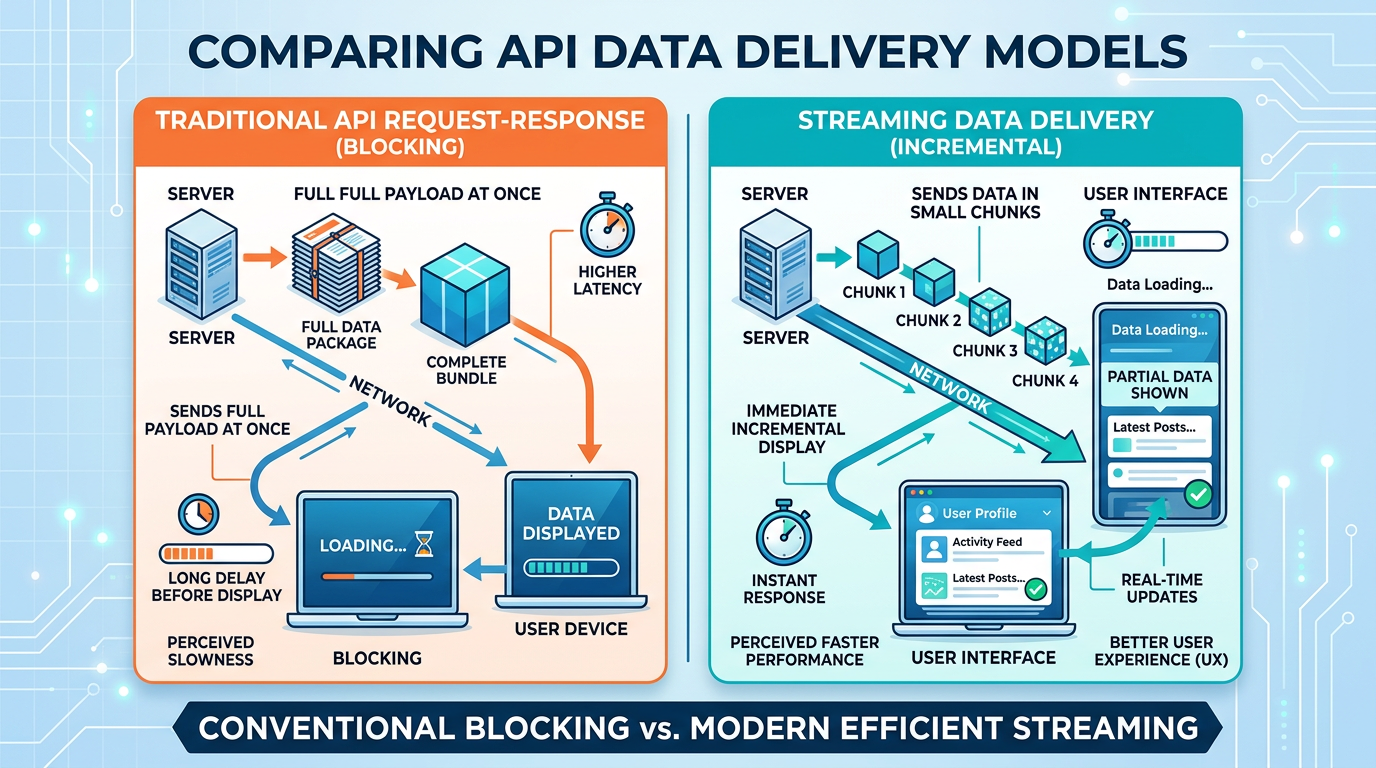
Streaming responses work differently. Instead of waiting for the complete response, the server sends data in chunks as soon as each piece is ready. Think of it like watching a live video stream—you start seeing content immediately while more data continues to arrive.
Why AI workflows use streaming:
- Faster perceived performance: Users see results immediately instead of staring at loading spinners
- Better user experience: Progressive text generation feels more natural and engaging
- Lower memory usage: You can process data incrementally instead of loading massive responses into memory
- Real-time feedback: Perfect for chatbots, content generation, and interactive AI applications
For AI language models that generate hundreds or thousands of tokens, streaming transforms the user experience from “waiting 10 seconds for an answer” to “watching the answer appear in real time.”
Why Use an SDK for Processing Streaming Responses
You could implement streaming from scratch using low-level HTTP libraries, but SDKs save you from dealing with complex details like chunked transfer encoding, connection management, error recovery, and protocol-specific formatting.
SDKs handle the hard parts:
- Managing persistent HTTP connections
- Parsing streaming event formats (like Server-Sent Events)
- Automatic retries and error handling
- Authentication and rate limiting
- Type-safe interfaces (in typed languages)
The OpenAI Python SDK, for example, abstracts away the complexity of consuming streaming responses, letting you focus on what matters: building your application logic.
Prerequisites for This Beginner Streaming SDK Guide
For the latest official details, see pip install openai.
Before diving into code, you’ll need:
- Python 3.8 or higher installed on your system
- An OpenAI API key (sign up at the OpenAI platform if you don’t have one)
- Basic Python knowledge (variables, functions, loops)
- A code editor (VS Code, PyCharm, or any text editor)
- pip for installing Python packages
You should also have a basic understanding of API requests, though we’ll explain streaming-specific concepts as we go.
Environment setup:
pip install openaiThis installs the official Python library for the OpenAI API. Before following installation steps, check the latest official documentation because setup methods may change between versions.
Set your API key as an environment variable for security:
export OPENAI_API_KEY='your-api-key-here'On Windows, use set instead of export.
Your First Streaming SDK Example
For the latest official details, see stream=True parameter usage in the Responses API.

Let’s start with the simplest possible streaming example. This code creates a chat completion request with streaming enabled and prints each chunk as it arrives:
from openai import OpenAI

# Initialize the client (reads OPENAI_API_KEY from environment)
client = OpenAI()

# Create a streaming chat completion
stream = client.chat.completions.create(
    model="gpt-4",
    messages=[{"role": "user", "content": "Explain streaming in one sentence."}],
    stream=True  # Enable streaming
)

# Process each chunk as it arrives
for chunk in stream:
    # Extract the content from the chunk
    if chunk.choices[0].delta.content is not None:
        print(chunk.choices[0].delta.content, end="", flush=True)

print()  # New line at the end
What’s happening here:
- We initialize the OpenAI client, which automatically reads your API key from the environment
- We call
chat.completions.create()withstream=Trueto enable streaming - The method returns an iterator that yields chunks as they arrive
- We loop through each chunk and print the content incrementally
- The
end=""andflush=Trueparameters ensure text appears immediately without line breaks
Run this code and you’ll see the response appear character by character, just like ChatGPT’s interface.
How to Handle Streaming Data: Processing Chunks and Events
Processing streaming responses requires understanding what data arrives in each chunk and how to accumulate it correctly.
Anatomy of a streaming chunk:
Each chunk from the OpenAI streaming API contains a delta object with partial content. Early chunks might contain the beginning of a word, middle chunks continue it, and the final chunk signals completion.
Here’s how to accumulate the full response while processing chunks:
from openai import OpenAI

client = OpenAI()

stream = client.chat.completions.create(
    model="gpt-4",
    messages=[{"role": "user", "content": "Write a haiku about automation."}],
    stream=True
)

# Accumulate the complete response
full_response = ""

for chunk in stream:
    content = chunk.choices[0].delta.content
    if content is not None:
        full_response += content
        print(content, end="", flush=True)

print("\n\n--- Complete Response ---")
print(full_response)
This pattern is essential for real-time data SDK applications where you need both progressive display and the final complete result (for example, saving to a database or passing to another workflow step).
Error Handling and Common Issues When Processing Streaming Responses
Streams can fail mid-response due to network issues, API errors, or rate limits. Unlike traditional requests where errors happen at the beginning, streaming errors can occur after you’ve already received partial data.
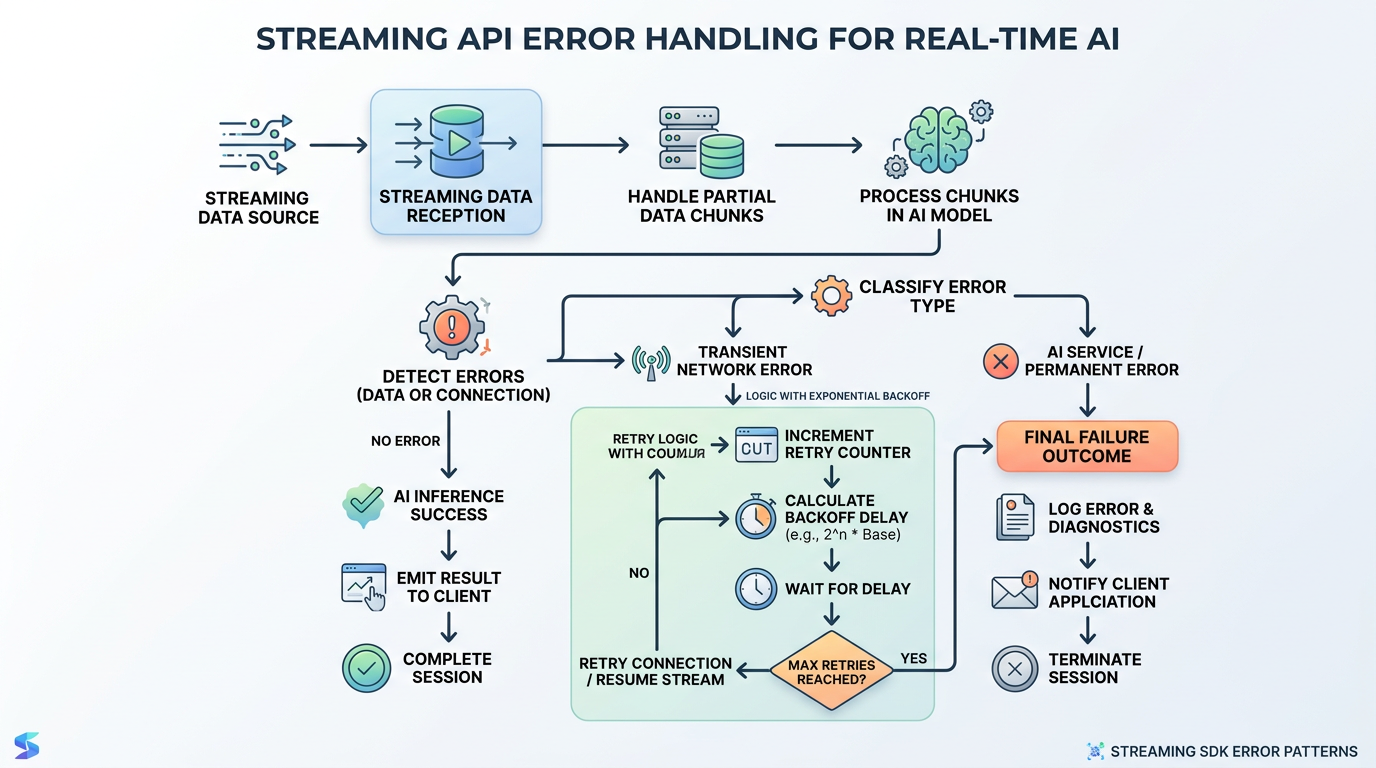
Robust error handling pattern:
from openai import OpenAI
import time

client = OpenAI()

max_retries = 3
retry_count = 0

while retry_count < max_retries:
    try:
        stream = client.chat.completions.create(
            model="gpt-4",
            messages=[{"role": "user", "content": "Explain APIs briefly."}],
            stream=True,
            timeout=30  # 30 second timeout
        )

        for chunk in stream:
            content = chunk.choices[0].delta.content
            if content is not None:
                print(content, end="", flush=True)

        print()  # Success - exit retry loop
        break

    except Exception as e:
        retry_count += 1
        print(f"\nError occurred: {e}")

        if retry_count < max_retries:
            wait_time = 2 ** retry_count  # Exponential backoff
            print(f"Retrying in {wait_time} seconds...")
            time.sleep(wait_time)
        else:
            print("Max retries reached. Please try again later.")
Key error handling strategies:
- Timeouts: Set reasonable timeout values to prevent hanging connections
- Retry logic: Implement exponential backoff for temporary failures
- Partial response handling: Decide whether to keep or discard partial responses on error
- Graceful degradation: Fall back to non-streaming requests if streaming consistently fails
Real-Time AI Workflow Patterns
Beyond simple console printing, streaming enables powerful real-time workflow patterns.
Pattern 1: Progress indicators
Show users that processing is active, even before content arrives:
import sys

# Print a progress indicator before content starts
print("Generating response", end="", flush=True)

for chunk in stream:
    content = chunk.choices[0].delta.content
    if content is not None:
        # Clear progress indicator on first content
        sys.stdout.write("\r" + " " * 30 + "\r")
        print(content, end="", flush=True)
Pattern 2: Token counting and cost tracking
Monitor usage in real time:
token_count = 0

for chunk in stream:
    if chunk.choices[0].delta.content is not None:
        # Rough token estimation (4 chars ≈ 1 token)
        token_count += len(chunk.choices[0].delta.content) / 4
        print(chunk.choices[0].delta.content, end="", flush=True)

print(f"\n\nEstimated tokens: {int(token_count)}")
Pattern 3: Building streaming chatbots
Combine streaming with conversation history for interactive experiences:
conversation_history = []

while True:
    user_input = input("\nYou: ")
    if user_input.lower() in ['quit', 'exit']:
        break

    # Add user message to history
    conversation_history.append({"role": "user", "content": user_input})

    print("Assistant: ", end="", flush=True)

    # Stream the response
    stream = client.chat.completions.create(
        model="gpt-4",
        messages=conversation_history,
        stream=True
    )

    assistant_response = ""
    for chunk in stream:
        content = chunk.choices[0].delta.content
        if content is not None:
            assistant_response += content
            print(content, end="", flush=True)

    # Add assistant response to history
    conversation_history.append({"role": "assistant", "content": assistant_response})
    print()
Common Beginner Mistakes
Mistake 1: Forgetting flush=True
Without flush=True, Python buffers output and you won’t see real-time printing:
# Wrong - buffered output
print(content, end="")

# Right - immediate output
print(content, end="", flush=True)
Mistake 2: Not checking for None
Chunks may not always contain content, especially the final chunk:
# Wrong - will crash on None
print(chunk.choices[0].delta.content, end="")

# Right - check before using
if chunk.choices[0].delta.content is not None:
    print(chunk.choices[0].delta.content, end="")
Mistake 3: Blocking the main thread
In GUI or web applications, processing streams synchronously freezes the interface. Use async patterns or threading:
from openai import AsyncOpenAI
import asyncio

async def stream_response():
    client = AsyncOpenAI()

    stream = await client.chat.completions.create(
        model="gpt-4",
        messages=[{"role": "user", "content": "Hello!"}],
        stream=True
    )

    async for chunk in stream:
        if chunk.choices[0].delta.content is not None:
            print(chunk.choices[0].delta.content, end="", flush=True)

asyncio.run(stream_response())
Mistake 4: Ignoring rate limits
Streaming requests count against the same rate limits as regular requests. Monitor your usage and implement queuing for high-volume applications.
Frequently Asked Questions
Does streaming cost more than regular API calls?
No. Streaming and non-streaming requests use the same token-based pricing. You pay for the tokens generated, not for how they’re delivered. Check the official pricing page for current rates.
Can I use streaming in serverless functions?
Yes, but with considerations. Some serverless platforms have timeout limits that may interrupt long streams. Ensure your function timeout exceeds the expected stream duration, or use asynchronous patterns that can handle partial results.
How do I integrate streaming into n8n workflows?
Direct streaming support in n8n depends on current n8n capabilities. For advanced streaming integrations, consider using the Code node to run Python or JavaScript streaming code, or call an external service that handles streaming and returns the complete result.
What’s the difference between Server-Sent Events (SSE) and what OpenAI uses?
OpenAI’s streaming API uses a format similar to Server-Sent Events, with responses delivered over HTTP with a text/event-stream content type. The SDK abstracts these details, but understanding SSE helps with debugging and building custom streaming implementations.
Can I stream responses in JavaScript for web applications?
Yes. The official OpenAI JavaScript/TypeScript SDK (installed via npm install openai) supports streaming with async/await patterns. For browser applications, be mindful of CORS policies and consider proxying requests through your backend.
Next Steps: Building Production-Ready Streaming Applications
You now understand the fundamentals of processing streaming responses using SDKs for real-time AI workflows. You’ve learned to enable streaming, process chunks, handle errors, and avoid common pitfalls.
To take your streaming skills further:
- Explore the Anthropic SDK for Claude API streaming with different patterns
- Implement streaming in web applications using JavaScript SDKs and async iterators
- Integrate streaming into automation platforms like n8n or custom workflow engines
- Study backpressure handling for high-throughput streaming applications
- Implement production monitoring and logging for streaming performance
Remember that SDK APIs and streaming behaviors evolve. Before implementing production systems, verify the latest patterns in the official documentation. The streaming SDK approach you’ve learned here forms the foundation for building responsive, real-time AI applications that delight users with immediate feedback and smooth interactions.
Start small, test thoroughly, and gradually add complexity as you become comfortable with streaming patterns. Your users will appreciate the difference.
Enjoyed this article?