
Claude API Pricing Guide: How to Understand and Optimize Your AI API Costs
Focus keyword: Claude API pricing guide
If you’re building with AI APIs, understanding how much your project will actually cost can feel overwhelming. Claude’s API pricing follows a token-based model that works differently than traditional per-request or subscription pricing, and without a clear grasp of the system, you might face surprise bills or struggle to estimate your budget.
This Claude API pricing guide walks you through everything you need to understand Claude’s cost structure, how to estimate your expenses before you build, and practical strategies to keep your AI API costs under control.
▶Previous tutorial : How to Choose AI Model for Automation: Beginner’s Practical Guide
Who This Tutorial Is For
This guide is designed for:
- Developers building applications that integrate Claude’s API
- No-code builders using automation tools like n8n with Claude
- Tech-savvy beginners exploring AI API projects for the first time
- Anyone who wants to understand API cost optimization before committing to a paid service
You don’t need deep technical expertise, but basic familiarity with APIs and development workflows will help you apply the examples.
Understanding Token-Based Pricing: The Foundation
Before we dive into Claude’s specific pricing, you need to understand what tokens are and why APIs charge based on them.
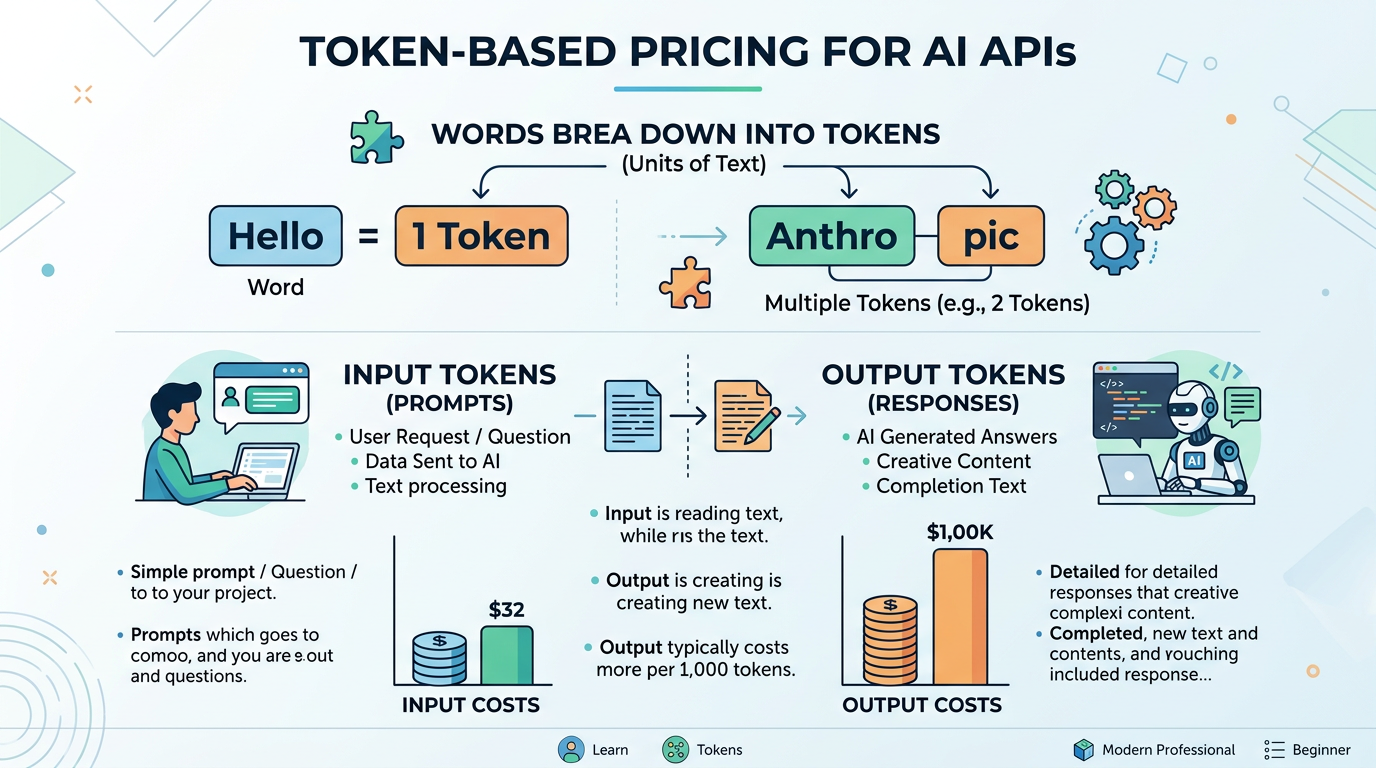
Tokens are chunks of text that AI models process. They’re not exactly words—a token might be a word, part of a word, or even punctuation. For example:
- “Hello” = 1 token
- “Anthropic” = 2 tokens (often split as “Anth” + “ropic”)
- “AI automation” = 3 tokens
Think of tokens as the basic units of computation. The more tokens your prompt contains, and the more tokens the AI generates in response, the more processing power is required—and the more you pay.
Why charge by tokens instead of requests? Because generating a simple one-word answer costs far less computational resources than producing a 2,000-word article. Token-based pricing scales fairly with actual usage.
Claude API Token Cost: Input vs. Output Pricing
Claude charges different rates for input tokens (what you send in your prompt) and output tokens (what Claude generates in response).
This distinction matters because:
- Input tokens are typically cheaper since they only need to be read and processed
- Output tokens are more expensive because the model must generate each one
Understanding this split is essential for accurate cost estimation. A chatbot that receives long documents but responds with short answers has a very different cost profile than a content generation tool that produces lengthy outputs.
Current Claude Model Lineup
As of mid-2026, Claude’s primary models include:
- Claude Opus 4.8 – The most capable model for complex reasoning and analysis
- Claude Sonnet 4.6 and Sonnet 5 – Balanced performance and cost, suitable for most applications
- Claude Haiku 4.5 – The fastest, most cost-effective option for simpler tasks
- Claude Fable 5 and Mythos 5 – Newer 5-series models with varying availability
The older Claude 3 models (Haiku 3, Sonnet 3.x, Opus 3) have been deprecated or retired, so always check Anthropic’s Models overview page and Model deprecations page for the current active lineup before planning your implementation.
Important: Exact pricing per million tokens varies by model and changes over time. Always verify current rates on the official Anthropic pricing page before making budget decisions or starting a project.
How to Calculate Your Claude API Costs
Let’s walk through a practical cost estimation process.
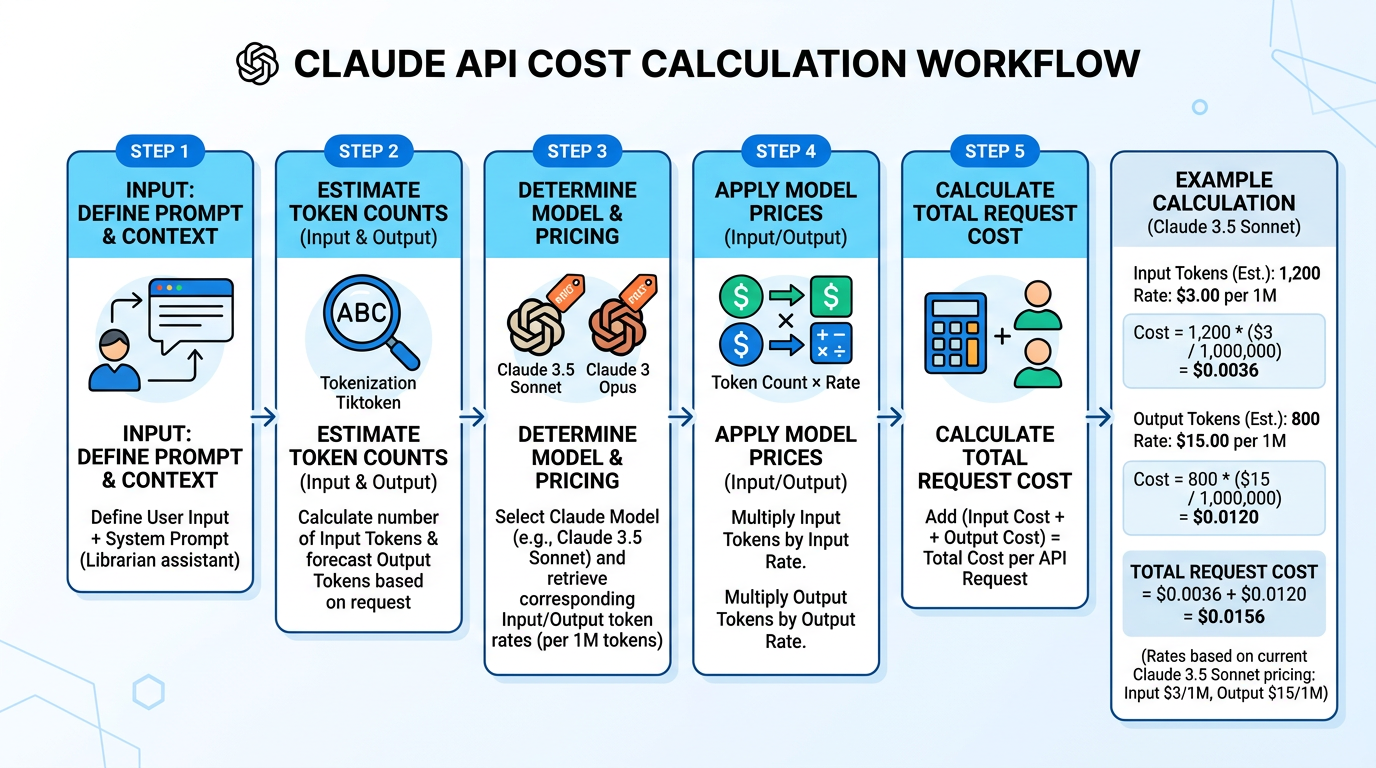
Step 1: Estimate Your Token Count
Before you make any API calls, estimate how many tokens your typical request will use:
- Draft your typical prompt (input)
- Estimate the expected response length (output)
- Convert text to approximate token counts
As a rough guideline, 1 token ≈ 4 characters or 0.75 words in English. So a 100-word prompt is roughly 133 tokens, and a 500-word response is approximately 665 tokens.
Step 2: Apply Model-Specific Rates
Once you know your token counts, apply the pricing for your chosen model:
Example scenario (using placeholder rates—verify current prices):
- Prompt: 200 tokens (input)
- Response: 800 tokens (output)
- Model: Claude Sonnet 4.6
If hypothetical rates were $3 per million input tokens and $15 per million output tokens:
- Input cost: (200 / 1,000,000) × $3 = $0.0006
- Output cost: (800 / 1,000,000) × $15 = $0.012
- Total per request: ~$0.0126
For 1,000 requests per day, that’s approximately $12.60 daily or $378 monthly.
Step 3: Account for Context in Conversations
Multi-turn conversations accumulate costs quickly because each turn includes the full conversation history as input.
Example: A 5-turn support chat
- Turn 1: 200 input + 150 output
- Turn 2: 350 input (200 + 150 from turn 1) + 100 output
- Turn 3: 450 input (previous 350 + 100) + 120 output
- Turn 4: 570 input + 80 output
- Turn 5: 650 input + 90 output
Notice how input tokens grow with each turn. Managing context window size becomes a key cost optimization strategy for conversational applications.
API Pricing Comparison: Claude vs. Alternatives
When evaluating Claude API token cost against competitors, consider both price and performance.
As of mid-2026, the major alternatives include:
- OpenAI GPT-4 and GPT-4.1 – Often comparable pricing with different performance characteristics
- Google Gemini – Competitive pricing with varying context window capabilities
Each provider updates pricing regularly, so perform direct comparisons using current official pricing pages when making your decision. Claude’s 1-million-token context window and high maximum output (up to 128k tokens synchronously, or 300k via the Message Batches API with special headers) may offer unique value for certain use cases even if per-token rates vary.
7 Strategies to Reduce AI API Costs
Here’s how to implement practical API cost optimization techniques:
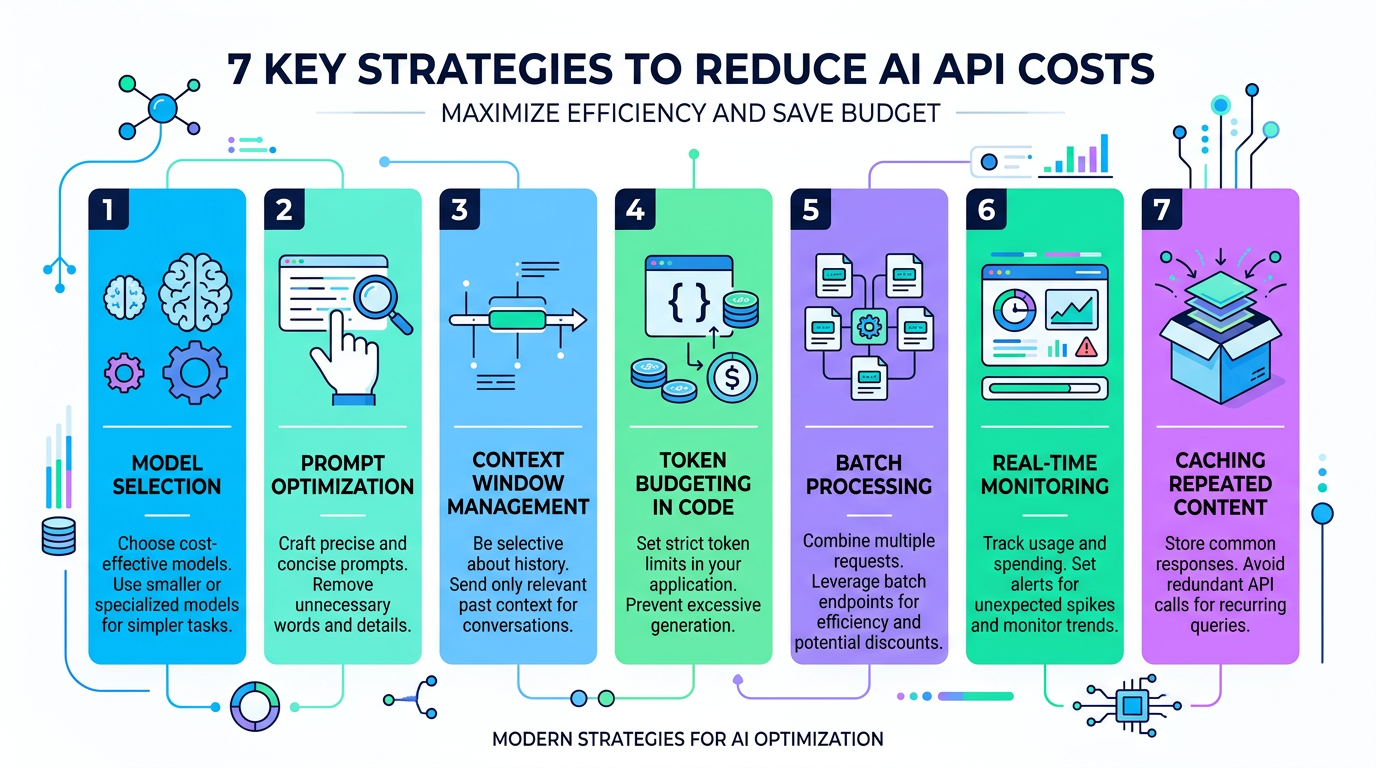
1. Choose the Right Model for Each Task
Don’t default to the most powerful model. Use:
- Haiku for classification, simple Q&A, or fast tasks
- Sonnet for balanced reasoning and content generation
- Opus only when you need maximum capability
Switching a simple task from Opus to Haiku can cut costs by 70% or more.
2. Optimize Your Prompts
Shorter, clearer prompts reduce input tokens without sacrificing quality:
- Remove unnecessary examples once the model understands your pattern
- Use concise instructions
- Avoid repeating context that can be referenced
3. Manage Context Window Size
In multi-turn conversations:
- Summarize old conversation turns instead of passing full history
- Implement a sliding window that keeps only recent turns
- Remove redundant context after each exchange
4. Set Token Budgets in Code
Prevent runaway costs by implementing programmatic limits:
# Pseudocode example
max_input_tokens = 1000
max_output_tokens = 500

if estimate_tokens(prompt) > max_input_tokens:
    prompt = truncate_or_summarize(prompt, max_input_tokens)

response = claude_api.call(
    prompt=prompt,
    max_tokens=max_output_tokens
)
5. Use Batch Processing When Possible
The Message Batches API may support higher output token limits for non-urgent workloads. If your use case allows delayed responses, batch processing can offer better throughput and potentially different cost characteristics. Check the official API reference to confirm current batch capabilities and any associated pricing structures.
6. Monitor Usage in Real-Time
Implement cost tracking from day one:
- Extract token counts from API response metadata
- Log usage per request
- Set up dashboards to visualize spending trends
- Create alerts when daily or monthly budgets approach thresholds
7. Cache Repeated Content (If Available)
If Anthropic offers prompt caching features for your model, repeated queries with shared context can dramatically reduce costs. Always verify current caching availability and pricing on the official documentation before relying on this optimization.
Managing AI API Expenses: Monitoring and Control
Effective cost management requires ongoing monitoring, not just initial optimization.
Set Up Usage Tracking
Track these metrics continuously:
- Total tokens per day (input + output separately)
- Cost per request (to identify expensive outliers)
- Cost per user or session (for multi-user applications)
- Model usage distribution (which models you’re calling most often)
Implement Spending Alerts
Configure alerts in the Anthropic Console or your own monitoring system to notify you when:
- Daily spending exceeds a threshold
- Weekly spending trends suggest you’ll exceed monthly budget
- Unusual usage patterns appear (potential bugs or abuse)
Test Before Scaling
Before launching in production:
- Run realistic load tests in development
- Calculate actual costs for your expected volume
- Set conservative initial budgets
- Scale gradually while monitoring costs
Common API Cost Pitfalls to Avoid
Watch out for these beginner mistakes:
Accidental infinite loops: A bug that repeatedly calls the API can burn through your budget in minutes. Always implement retry limits and circuit breakers.
Unoptimized prompts in production: What works in testing might be inefficient at scale. Regularly audit your prompts for unnecessary verbosity.
Ignoring context accumulation: Multi-turn conversations can quietly inflate costs. Implement context management from the start.
Using the wrong model: Defaulting to the most powerful model for every task wastes money. Profile your use cases and match them to appropriate models.
No monitoring until the bill arrives: Set up real-time tracking before your first production request, not after you receive a surprise invoice.
Frequently Asked Questions
How much does Claude API actually cost for a typical project? It depends entirely on your token usage. A simple chatbot handling 1,000 short conversations per day might cost $5–$20/month, while a document analysis service processing hundreds of long PDFs daily could cost hundreds or thousands. Always estimate based on your specific use case.
Can I set a hard spending limit? Check the Anthropic Console for current budget control features. At minimum, implement programmatic limits in your application code to prevent runaway costs.
Do I pay for the entire conversation history every time? Yes, in multi-turn conversations, the full context is typically sent as input tokens each turn. This is why context management is crucial for cost control.
Which Claude model should I start with? For most beginners, start with Claude Sonnet (4.6 or 5) as it offers a good balance of capability and cost. Test with a small budget, measure performance, then adjust to Haiku (cheaper) or Opus (more capable) based on your actual needs.
How do I track my spending in real-time? Use the Anthropic Console’s usage dashboards (verify current features in the official documentation), and implement logging in your application to track token usage from API response headers or metadata.
Next Steps: Start Estimating Your Costs
Now that you understand Claude API pricing and cost optimization strategies, here’s how to move forward:
- Visit the official Anthropic pricing page to get current per-token rates for each model
- Draft a typical prompt for your use case and estimate token counts
- Calculate projected costs for your expected monthly volume
- Set a test budget (start small—$10–$50 is enough to learn)
- Implement basic monitoring before making your first production call
- Review and optimize weekly during your first month
Remember that managing AI API expenses is an ongoing process, not a one-time setup. As your application evolves and scales, regularly revisit your model choices, prompt designs, and monitoring strategies to keep costs under control.
The key to successful API cost management is starting with clear visibility, testing your assumptions with real usage data, and continuously optimizing based on what you learn. With the foundation from this Claude API pricing guide, you’re ready to build confidently without fear of surprise bills.
References
Enjoyed this article?