
AI Cost Optimization Strategies Tutorial: Caching, Batching, and Model Downgrades Explained
Focus keyword: AI cost optimization strategies tutorial
Running AI workflows can get expensive fast. A side project chatbot handling 10,000 API calls per month can easily rack up $300+ in costs. A production application processing thousands of requests daily? That bill can hit thousands of dollars monthly.
The good news: you can dramatically reduce these costs without sacrificing functionality. This AI cost optimization strategies tutorial walks you through three proven techniques—response caching, request batching, and strategic model downgrades—that work together to cut your AI operational expenses by 50% to 80% depending on your use case.
You’ll learn practical implementation steps for each strategy, see real cost comparisons, and get decision frameworks to choose which approach fits your workflow. Whether you’re building with code, n8n automation, or a mix of both, you’ll finish this guide ready to implement meaningful savings today.
▶Previous tutorial : Claude API Pricing Guide: How to Understand and Optimize Your AI API Costs
Who This Tutorial Is For
This guide is designed for:
- Developers building applications that call LLM APIs (OpenAI, Anthropic Claude, etc.)
- No-code builders using n8n or similar automation platforms with AI nodes
- Tech-savvy beginners managing AI projects and watching costs climb
- Startup founders looking to extend runway by optimizing AI spend
You should have basic familiarity with API calls and understand that LLMs charge per token (roughly per word). You don’t need to be an expert—we’ll explain concepts clearly and show both code and no-code paths.
Understanding Your Current AI Costs
For the latest official details, see OpenAI API Pricing page.
Before optimizing, you need to know where your money goes. Most AI costs come from:
- Model pricing tiers: Premium models (GPT-4, Claude 3.5 Sonnet) cost 10-30x more per token than efficient models (GPT-3.5, Claude 3 Haiku)
- Token volume: Both input (your prompts) and output (AI responses) count toward costs
- Request frequency: Real-time processing means paying for every single call immediately
- Redundant calls: Asking the same or similar questions multiple times without reusing answers
Take five minutes right now to audit your costs:
- Log into your OpenAI or Anthropic dashboard
- Check your usage for the past 30 days
- Identify your most-used models
- Note your total request count
This baseline helps you measure savings after implementing the strategies below.
Caching Strategies for AI: Store and Reuse Responses
What it is: Caching means storing AI responses so identical or similar requests don’t require new API calls. Instead of paying OpenAI or Anthropic every time, you retrieve the saved answer.
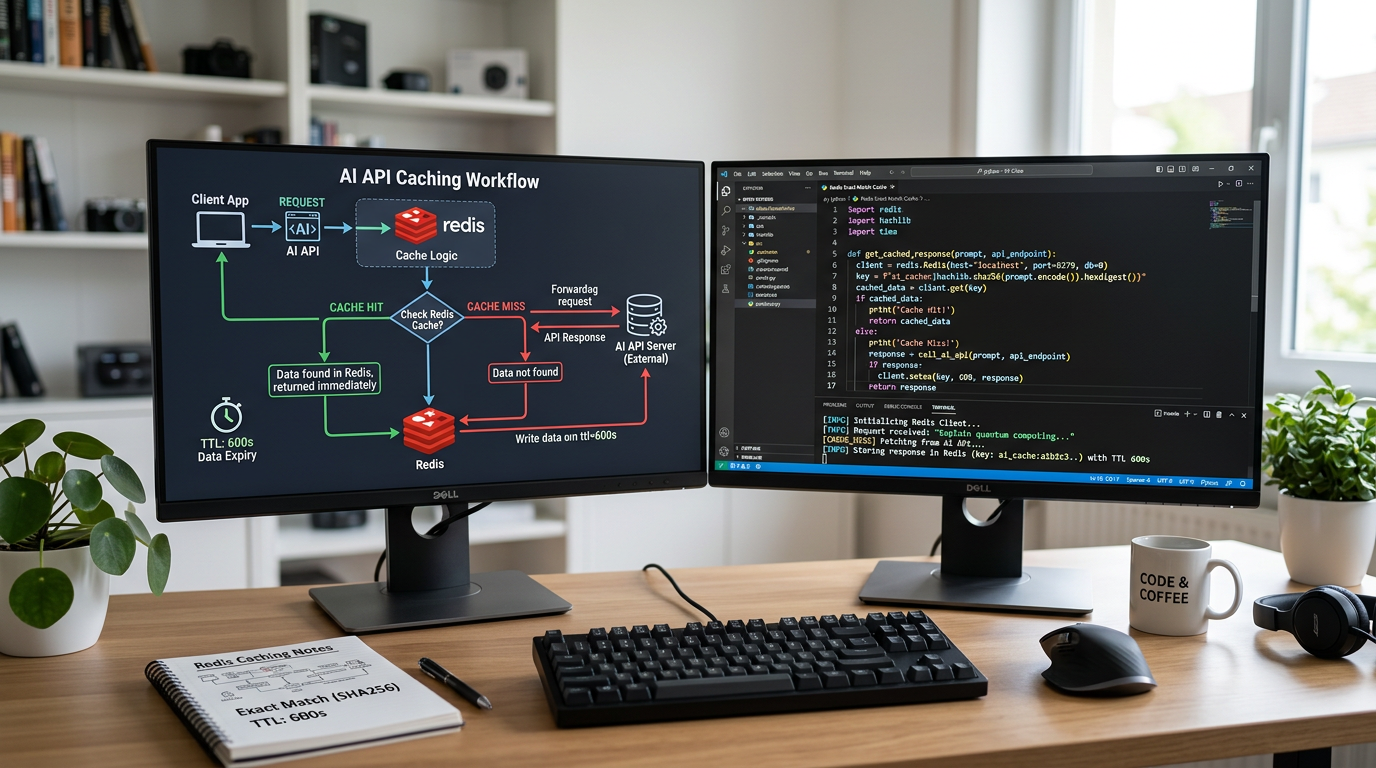
When to cache: Use caching when users frequently ask the same questions, when you process similar data repeatedly, or when content doesn’t change often. Don’t cache when every request needs fresh, unique output or when responses must reflect real-time data.
Exact Match Caching Implementation
The simplest caching approach checks if you’ve seen the exact same input before.
Code example (Python with Redis):
import redis
import json
import hashlib
from openai import OpenAI

redis_client = redis.Redis(host='localhost', port=6379, decode_responses=True)
openai_client = OpenAI()

def get_cached_response(prompt, model="gpt-3.5-turbo", ttl=3600):
    # Create cache key from prompt and model
    cache_key = hashlib.md5(f"{model}:{prompt}".encode()).hexdigest()

    # Check cache first
    cached = redis_client.get(cache_key)
    if cached:
        return json.loads(cached)

    # Cache miss - call API
    response = openai_client.chat.completions.create(
        model=model,
        messages=[{"role": "user", "content": prompt}]
    )
    result = response.choices[0].message.content

    # Store in cache with TTL (time-to-live in seconds)
    redis_client.setex(cache_key, ttl, json.dumps(result))

    return result
n8n workflow approach:
- Add a Redis node before your OpenAI node
- Configure it to “Get” using a key based on your input text
- Add an IF node: if Redis returns data, skip the API call
- After the OpenAI node, add another Redis node to “Set” the response
- Set an expiration time (TTL) appropriate for your use case
Expected savings: 40-70% cost reduction if you have moderate request duplication. A FAQ chatbot might see 60% of questions repeated, immediately cutting costs in half for those requests.
Setting Time-to-Live (TTL) Correctly
Cached responses don’t stay fresh forever. Set TTL based on content type:
- Static content (product descriptions, documentation): 24-48 hours or longer
- Semi-dynamic content (daily summaries, reports): 1-6 hours
- Time-sensitive content (real-time data, personalized responses): 5-30 minutes or don’t cache
Too long, and you serve stale information. Too short, and you miss savings opportunities.
Batching API Requests Tutorial: Process in Groups for Discounts
For the latest official details, see OpenAI Batch API FAQ.
For the latest official details, see OpenAI Batch API documentation.
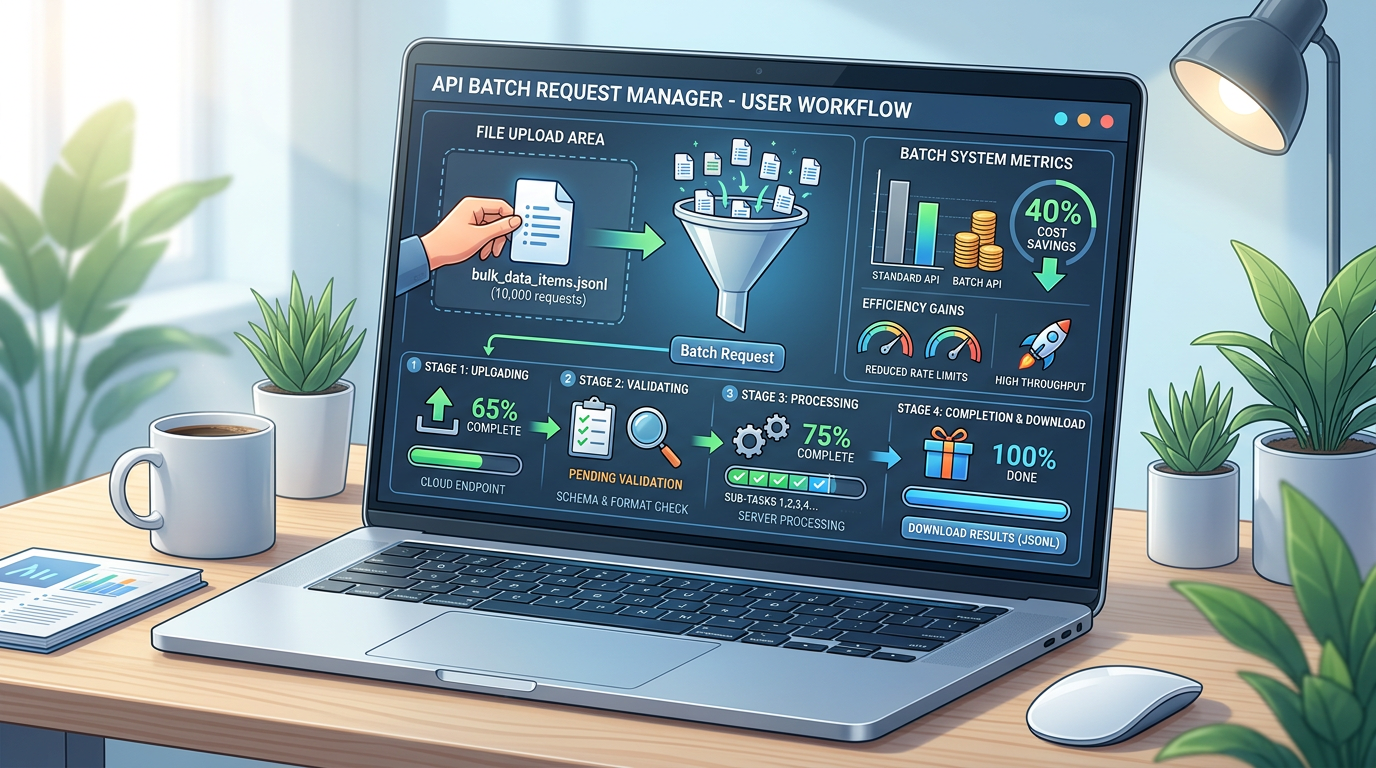
What it is: Instead of sending AI requests one at a time as they arrive, you collect multiple requests and process them together in a batch. Many providers offer significant discounts for batch processing because it lets them optimize their infrastructure.
When to batch: Perfect for non-urgent workloads like nightly data processing, bulk content generation, dataset labeling, evaluation runs, or scheduled reporting. Don’t batch when users need immediate responses or when real-time interaction matters.
OpenAI Batch API Implementation
OpenAI’s Batch API offers a 50% cost discount compared to synchronous APIs for supported models. Your batch processes within 24 hours, making it ideal for background tasks.
How it works:
- Prepare a JSONL file with all your requests
- Upload the file to OpenAI
- Create a batch job
- Poll for completion (usually within hours, guaranteed within 24 hours)
- Retrieve results once the batch finishes
Basic example:
from openai import OpenAI
client = OpenAI()

# Step 1: Create a file with batch requests
# Each line is a separate request in JSONL format
batch_file = client.files.create(
    file=open("batch_requests.jsonl", "rb"),
    purpose="batch"
)

# Step 2: Create the batch
batch = client.batches.create(
    input_file_id=batch_file.id,
    endpoint="/v1/chat/completions",
    completion_window="24h"
)

# Step 3: Check status
print(batch.status)  # 'validating', 'in_progress', 'completed', etc.

# Step 4: Retrieve results when complete
if batch.status == 'completed':
    result_file = client.files.content(batch.output_file_id)
    # Process your results
Your batch_requests.jsonl file looks like:
{"custom_id": "request-1", "method": "POST", "url": "/v1/chat/completions", "body": {"model": "gpt-3.5-turbo", "messages": [{"role": "user", "content": "Summarize this article..."}]}}
{"custom_id": "request-2", "method": "POST", "url": "/v1/chat/completions", "body": {"model": "gpt-3.5-turbo", "messages": [{"role": "user", "content": "Translate this text..."}]}}
Batch API limits: Up to 50,000 requests per batch, 200 MB input file size. You can create up to 2,000 batches per hour.
Expected savings: Immediate 50% cost reduction on batched requests compared to real-time API calls. For a workload processing 100,000 requests monthly, this alone saves hundreds of dollars.
Important note: Before implementing batch workflows, check the latest official documentation for current model support and any updated rate limits, as these details may change over time.
Batching Without Official Batch APIs
If you’re using a provider without a dedicated batch API, or if Anthropic doesn’t currently offer batch discounts, you can still batch by:
- Collecting requests in a queue over a defined window (e.g., every 5 minutes)
- Processing them sequentially or with controlled concurrency
- Gaining operational efficiency even without direct cost discounts
This approach saves money indirectly by reducing infrastructure overhead and making better use of rate limits.
Model Downgrade Benefits: Choose the Right Model for Each Task
What it is: Not every task needs your most powerful (and expensive) model. Strategic model downgrades mean routing simple tasks to cheaper models and reserving premium models for complex work that actually requires them.

The cost difference is dramatic. As of this writing, premium models can cost 10-30x more per token than efficient alternatives. Before using exact numbers in production, always check the official pricing pages for OpenAI and Anthropic, as rates change over time.
Task Complexity Assessment Framework
Use this decision tree to route requests:
Simple tasks (use efficient models like GPT-3.5, Claude 3 Haiku):
- Basic summarization of short content
- Simple classification (sentiment, category)
- Formatting and restructuring existing text
- Answering straightforward factual questions from provided context
- Basic translation
Complex tasks (use premium models like GPT-4, Claude 3.5 Sonnet):
- Nuanced creative writing
- Multi-step reasoning and analysis
- Complex code generation or debugging
- Detailed technical explanations
- Tasks requiring deep context understanding
Implementation pattern:
def route_to_model(task_type, complexity_score):
    """Route requests based on task requirements"""
    if task_type in ['classification', 'simple_summary', 'formatting']:
        return 'gpt-3.5-turbo'  # Efficient model
    elif complexity_score > 7:
        return 'gpt-4'  # Premium model for hard tasks
    else:
        return 'gpt-3.5-turbo'  # Default to efficient
Validation is critical: Don’t blindly downgrade. Run A/B tests on a sample of tasks, compare output quality, and measure user satisfaction. If the cheaper model performs adequately 95% of the time, the 10-30x cost reduction is worth it.
n8n Model Routing Example
In n8n:
- Add a Code node or Switch node to evaluate task type
- Route to different OpenAI nodes configured with different models
- Set simpler tasks to use
gpt-3.5-turboorgpt-4o-mini - Reserve
gpt-4orgpt-4-turbofor complex branches
Expected savings: 60-90% cost reduction on tasks successfully handled by efficient models. If 70% of your workload can move from GPT-4 to GPT-3.5, your total costs might drop by 50% or more.
Combining Strategies for Maximum AI Workflow Cost Reduction
The real power comes from stacking these techniques:
Example workflow architecture:
- Incoming request arrives
- Check cache (exact match): If hit, return cached response (cost: $0)
- Evaluate task complexity: Route to appropriate model tier
- Determine urgency: Batch non-urgent requests, process urgent ones immediately
- Execute request with selected model
- Cache response for future reuse
Real-world scenario: A customer support chatbot handling 10,000 queries per month.
Before optimization:
- All queries sent to GPT-4 immediately
- No caching
- Cost: ~$300/month (using example pricing)
After optimization:
- 50% of queries answered from cache (cost: $0 for those)
- 70% of remaining queries handled by GPT-3.5 (10x cheaper)
- 30% complex queries still use GPT-4
- Non-urgent analytics batched overnight (50% discount)
- New cost: ~$75-100/month
Total savings: 65-75% through combined strategies.
Common Mistakes and How to Avoid Them
Over-caching without invalidation: Set appropriate TTLs. Don’t serve month-old cached responses for time-sensitive questions.
Batch windows too long: Users notice when responses take hours. Match batch timing to actual urgency—overnight for reports, 5-10 minutes for low-priority tasks.
Aggressive downgrades without testing: Always validate output quality. A chatbot giving wrong answers because you downgraded too far costs more in lost customers than you saved on API calls.
Ignoring cache storage costs: Redis, database storage, and memory aren’t free. For most applications, caching is still far cheaper than repeat API calls, but monitor your infrastructure costs too.
Poor cache key design: Hash your inputs consistently. Including user IDs in cache keys when the response doesn’t change per user wastes cache space and reduces hit rates.
Measuring Your Cost Optimization Results
Track these metrics to validate your optimizations:
Cache hit rate: (cached responses / total requests) × 100. Aim for 30-60% for good ROI.
Average cost per request: Total API costs ÷ total requests. Track this weekly to see trends.
Model usage distribution: What percentage of requests use each model tier? Adjust routing rules based on actual patterns.
Batch utilization: How many requests are you successfully batching? Are batch windows optimal?
Set up simple logging in your application:
metrics = {
    'cache_hits': 0,
    'cache_misses': 0,
    'model_gpt35_calls': 0,
    'model_gpt4_calls': 0,
    'batched_requests': 0,
    'total_cost': 0.0
}
Review weekly and adjust your strategies based on data, not assumptions.
Downloadable Cost Optimization Templates
To help you implement these strategies immediately:
Cost analysis spreadsheet: Calculate your current costs, model what each strategy saves, and project new totals. Use this to prioritize which optimization to implement first.
Implementation checklist:
- [ ] Audit current API usage and costs
- [ ] Identify high-frequency repeated requests (caching candidates)
- [ ] Set up Redis or database for caching
- [ ] Implement cache with appropriate TTLs
- [ ] Measure cache hit rate for one week
- [ ] Categorize tasks by complexity
- [ ] A/B test cheaper models on simple tasks
- [ ] Implement model routing logic
- [ ] Identify batch-eligible workflows
- [ ] Set up batch processing for non-urgent tasks
- [ ] Monitor combined cost savings monthly
Decision framework worksheet: Answer questions about your use case (real-time requirements, task complexity distribution, request duplication rate) to get recommended strategy priorities.
These resources give you structured paths to implementation rather than generic advice.
Frequently Asked Questions
How much can I realistically save with AI cost optimization strategies? Most applications see 50-75% cost reduction by combining caching, batching, and model downgrades. Your actual savings depend on request patterns—high duplication favors caching, batch-friendly workloads favor batch APIs, and diverse task complexity favors model routing.
Which strategy should I implement first? Start with caching if you have repeated requests. It’s the fastest to implement and shows immediate ROI. Add model downgrades next after testing quality. Batching comes last since it requires workflow restructuring.
Do I need Redis for caching? Redis is ideal but not required. You can cache in a PostgreSQL database, SQLite file, or even in-memory dictionaries for single-server applications. Redis excels at TTL management and speed.
Will batching make my application too slow? Only batch non-urgent tasks. Keep real-time user interactions synchronous. Nightly reports, bulk processing, and background analytics are perfect candidates. Match your batch window to actual urgency—5 minutes for semi-urgent, overnight for reports.
How do I know if a cheaper model will work? Test on a sample of 50-100 real tasks. Compare outputs from premium and efficient models. Measure accuracy or user satisfaction. If the cheaper model succeeds 90%+ of the time, it’s likely safe for production.
Can I use these strategies with Claude or other providers? Absolutely. Caching works with any API. Model downgrades apply wherever providers offer model tiers (Anthropic has Claude 3.5 Sonnet vs Claude 3 Haiku). For batching, check if your provider offers a batch API with discounts; if not, you can still batch for operational efficiency.
What if my cache grows too large? Implement cache eviction policies (LRU – least recently used, or size limits). Monitor cache size weekly. Most applications with proper TTLs stay under a few GB, which costs pennies compared to API savings.
Next Steps: Implement Your AI Cost Optimization Strategies
You now understand three powerful techniques to reduce AI operational costs. Here’s your action plan:
This week:
- Audit your current costs and request patterns
- Implement basic caching for your most frequent requests
- Measure your cache hit rate
Next week:
- Categorize tasks by complexity
- Test a cheaper model on simple tasks
- Implement model routing for validated use cases
This month:
- Identify batch-eligible workflows
- Set up batch processing if your provider supports it
- Calculate your total savings and adjust strategies
The strategies in this AI cost optimization strategies tutorial are proven and practical. Start small, measure results, and scale what works. Your first implementation might save 30%—combined and refined, you’ll hit 60-80% reduction while maintaining quality.
Remember to check official documentation for current pricing, model availability, and API capabilities before deploying to production, as provider offerings evolve over time.
Now go optimize those costs.
Enjoyed this article?