
Choosing Claude Model: A Beginner’s Guide with Practical Examples
Focus keyword: choosing Claude model
If you’re building AI automation workflows, chatbots, or intelligent applications, choosing the right Claude model can mean the difference between a cost-effective solution and an unnecessarily expensive one. Claude isn’t a single AI—it’s a family of models with different capabilities, speeds, and price points. This guide will help you understand the current Claude lineup and confidently select the best model for your specific needs.
Who This Guide Is For
This tutorial is designed for:
- Developers building AI-powered applications or integrations
- No-code builders using tools like n8n, Make, or Zapier with Claude
- Tech-savvy beginners exploring AI automation for the first time
- Anyone who needs to choose between Claude models but doesn’t know where to start
You don’t need deep machine learning knowledge—just a basic understanding of APIs and a project that could benefit from AI capabilities.
Understanding the Claude Model Lineup
For the latest official details, see official Anthropic models overview.
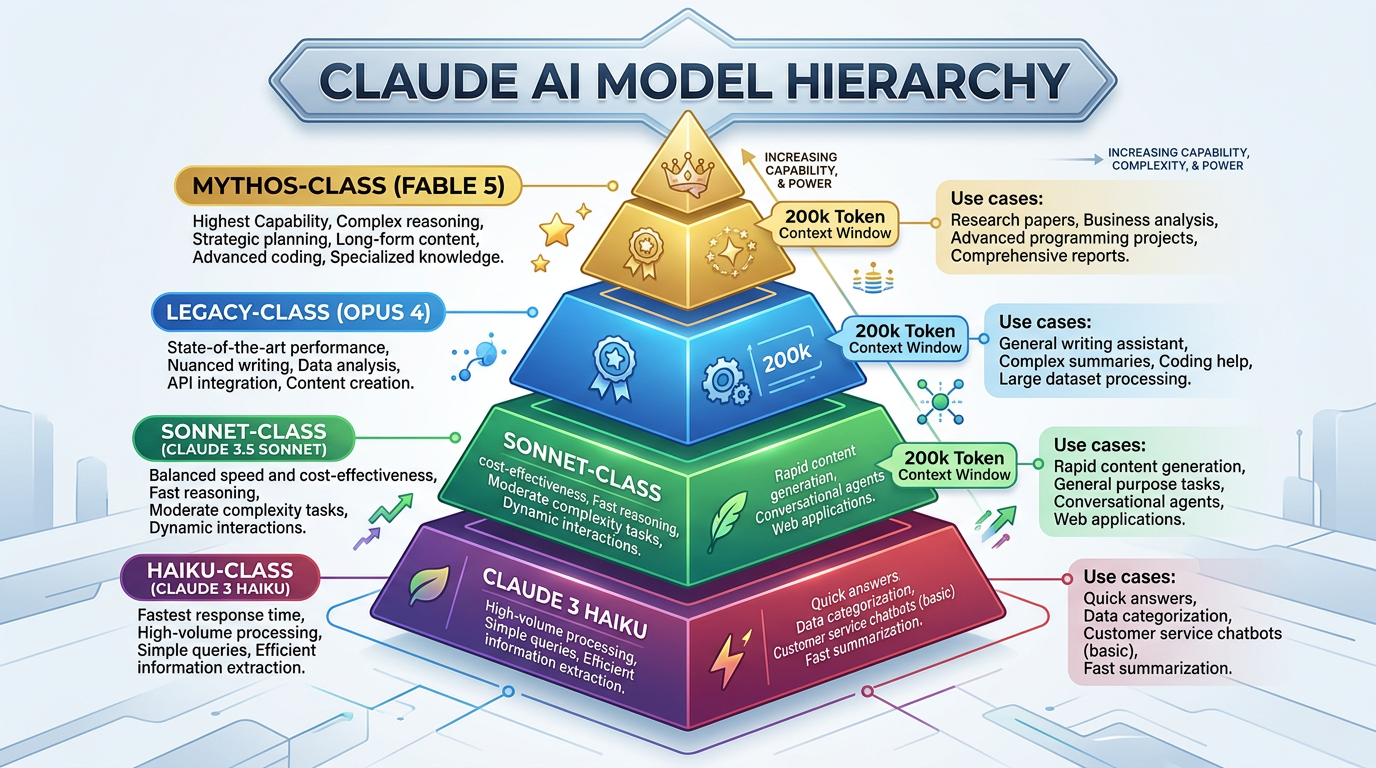
As of mid-2026, Anthropic offers Claude models organized into capability tiers. The earlier Claude 3 and 3.5 generations (including the original Opus, Sonnet, and Haiku models) have been fully retired. Today’s active lineup includes Claude 4.x models and the newer Mythos-class frontier models.
Here’s the current hierarchy from most to least capable:
- Mythos-class (Fable 5): The highest-capability frontier model, designed for the most complex reasoning tasks
- Opus-class (Opus 4.8): Powerful models for complex agentic coding and enterprise work
- Sonnet-class: Balanced models offering good performance at moderate cost
- Haiku-class: Fast, efficient models optimized for simple tasks and high-volume use
All current Claude models support text and image input, text output, multilingual capabilities, and vision. Most Claude 4 models offer 1 million token context windows with up to 128,000 output tokens, though smaller variants may have 200,000 token context windows with 64,000 max output tokens.
Important: Model specifications, pricing, and availability change over time. Always check the official Anthropic models overview and pricing page for the most current information before making production decisions.
How to Pick the Right Claude Model
Choosing a Claude model involves balancing four key factors:
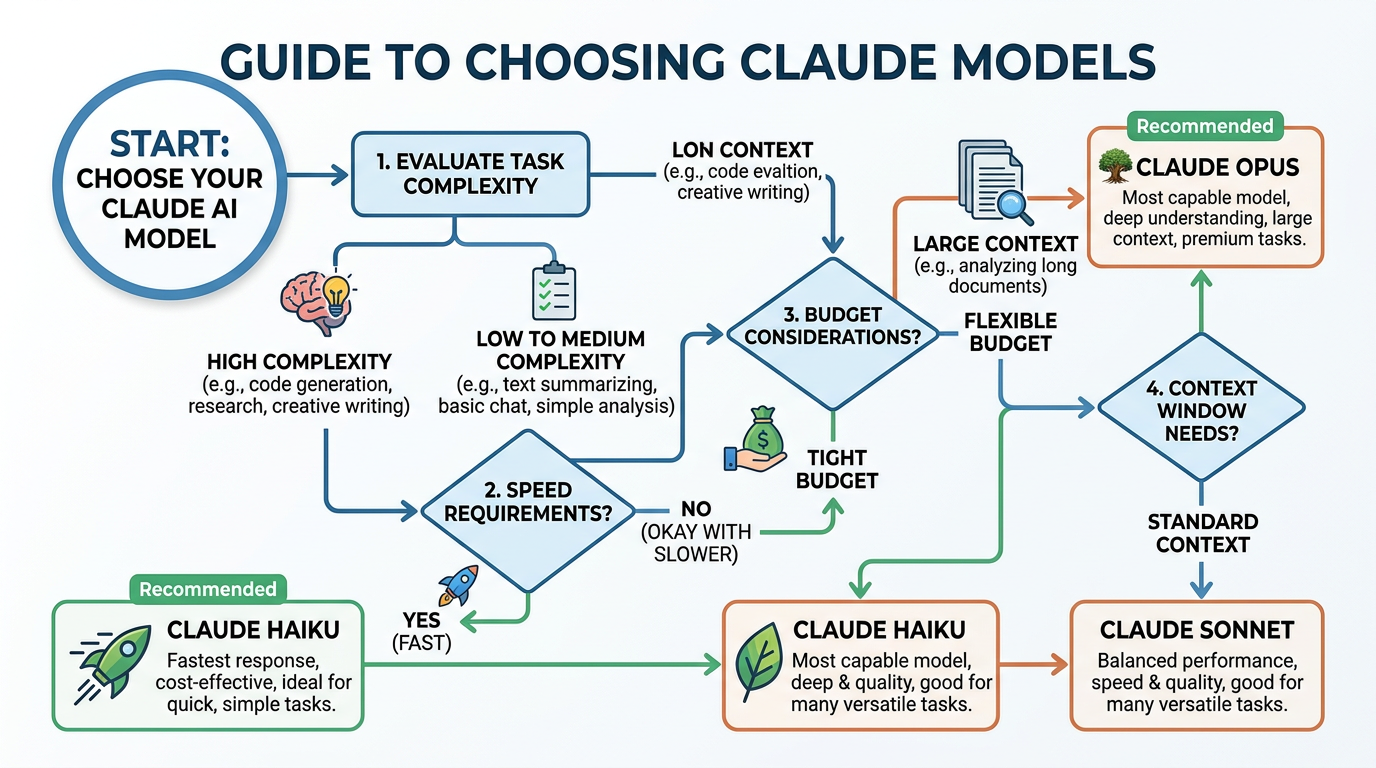
Task Complexity
Match your task’s reasoning requirements to model capability. Simple summarization or data extraction works fine with faster, cheaper models. Complex analysis, sophisticated code generation, or multi-step reasoning benefits from higher-tier models.
Ask yourself: Does my task require deep reasoning, nuanced understanding, or complex problem-solving? Or is it straightforward and repetitive?
Budget Considerations
Higher-capability models cost more per token. If you’re processing millions of tokens daily, even small per-token differences add up quickly.
Calculate realistically: Estimate your daily token usage, multiply by the pricing difference between models, and project monthly costs. The official Anthropic pricing page provides current rates for each model tier.
Speed and Latency
Faster models respond more quickly but may have lower reasoning capabilities. Real-time applications like chatbots often prioritize speed, while background processing tasks can afford to wait for more thoughtful responses.
Consider your use case: Do users expect instant responses, or are you running batch processes where a few extra seconds don’t matter?
Context Window Needs
If you’re working with long documents, extensive conversation history, or large codebases, you need sufficient context window capacity. Most Claude 4 models provide 1 million tokens—enough for hundreds of pages—but verify requirements for your specific use case.
Estimate your context: Add up the token count of your system prompt, conversation history, and any documents you’ll include in each request.
Claude AI Model Comparison: Practical Use Cases
Let’s look at real-world scenarios and which Claude model makes the most sense for each.
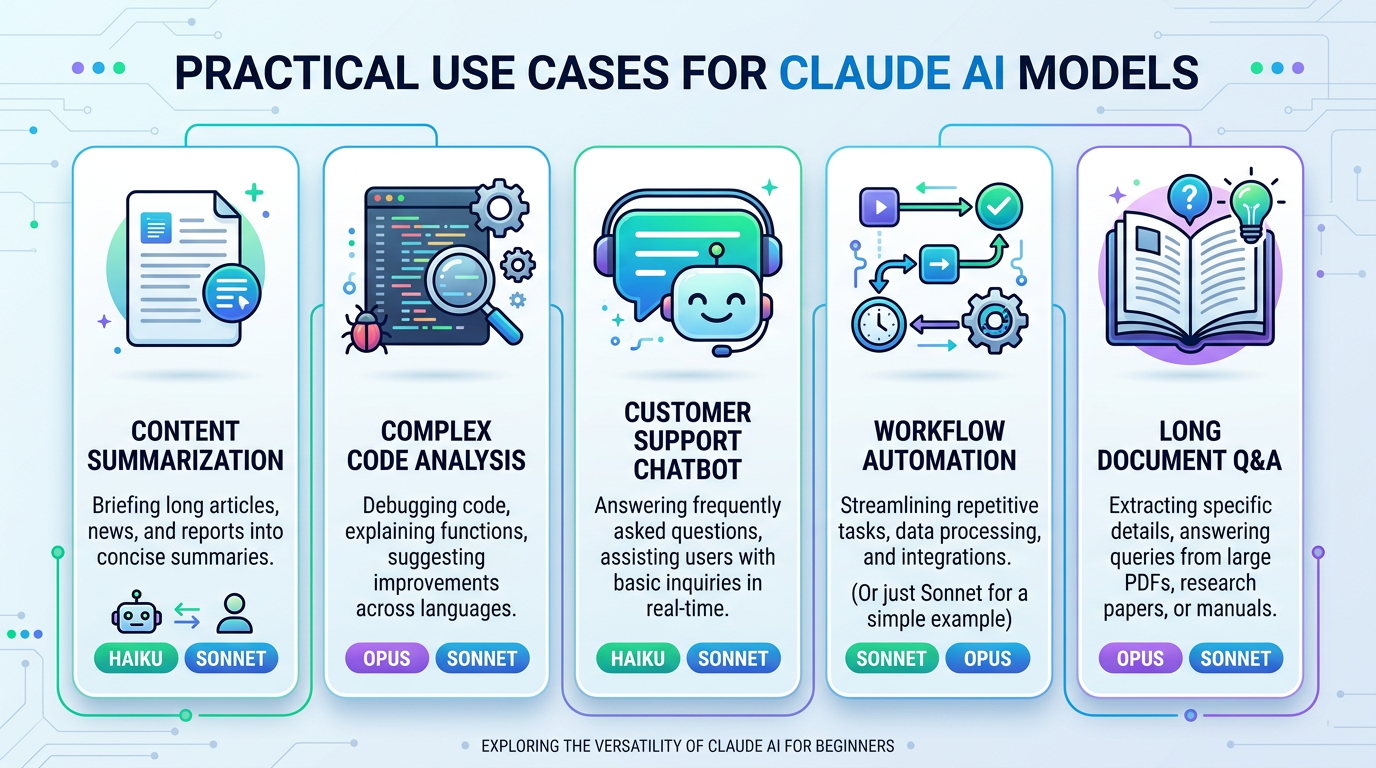
Simple Content Summarization
Scenario: Automatically summarize customer support tickets or news articles for internal dashboards.
Recommended model: Haiku-class
Why: Summarization is straightforward and doesn’t require deep reasoning. Haiku models are fast and cost-effective for high-volume, simple tasks. If you’re processing thousands of summaries daily, the cost savings are substantial compared to using Opus or Fable.
Alternative consideration: If summaries need nuanced understanding or your source documents are highly technical, consider testing a mid-tier Sonnet model.
Complex Code Analysis and Refactoring
Scenario: Analyze a legacy codebase, identify architectural issues, and suggest comprehensive refactoring strategies.
Recommended model: Opus 4.8 or Fable 5
Why: Code analysis that goes beyond syntax checking requires sophisticated reasoning about software architecture, design patterns, and dependencies. Higher-tier models understand context better and provide more accurate, actionable recommendations. The additional cost is justified when mistakes could lead to broken production code.
Cost-benefit trade-off: For simple syntax fixes or straightforward code completion, a Sonnet-class model may suffice and save money.
Customer Support Chatbot
Scenario: Build an automated chatbot that handles common customer questions about products, shipping, and returns.
Recommended model: Sonnet-class
Why: Customer support requires good language understanding and helpfulness but not necessarily the deepest reasoning. Sonnet models balance capability with reasonable latency and cost—important when you’re responding to potentially hundreds of conversations daily. They’re fast enough for real-time chat while still providing quality, contextually appropriate responses.
When to upgrade: If your chatbot needs to handle complex troubleshooting or technical support requiring multi-step reasoning, test an Opus-class model.
Automated Workflow in n8n
Scenario: Create an n8n automation that reads emails, extracts key information, categorizes requests, and drafts appropriate responses.
Recommended model: Start with Sonnet, scale based on volume and complexity
Why: n8n workflows often run continuously, so cost management matters. Sonnet provides good extraction and categorization accuracy without the premium pricing of Opus or Fable. Monitor your workflow performance and token usage, then adjust if needed.
Cost calculation: If your workflow processes 100 emails daily with an average of 500 tokens per email (input + output), calculate monthly token usage and multiply by per-token pricing to estimate costs. Compare this across model tiers to find the sweet spot.
Long Document Q&A
Scenario: Answer questions about technical documentation, legal contracts, or research papers that span 50+ pages.
Recommended model: Any Claude 4 model with 1M token context window
Why: Context window capacity is the primary constraint. Most Claude 4 models handle 1 million tokens, which accommodates lengthy documents with room for conversation history. Choose your tier based on query complexity—simple fact retrieval works with Haiku or Sonnet, while analysis requiring synthesis of information across the entire document benefits from Opus or Fable.
Tip: Use the Models API to programmatically check max_input_tokens for your chosen model before building your application.
Common Beginner Mistakes When Choosing Claude Models
Overpaying for Unnecessary Capability
Using Opus or Fable for simple tasks wastes money. Many beginners default to the most powerful model “just in case,” resulting in 3-5x higher costs for work that Haiku or Sonnet could handle perfectly well.
Fix: Start with a mid-tier model, test thoroughly, and only upgrade if results are unsatisfactory.
Underestimating Task Complexity
Conversely, choosing the cheapest model for genuinely complex tasks leads to poor output quality, requiring additional requests to fix or clarify—costing more in the end.
Fix: Be realistic about your task’s reasoning requirements. If you need analysis, synthesis, or nuanced judgment, invest in a higher-tier model from the start.
Ignoring Context Window Limits
Sending requests that exceed model context limits results in errors or truncated input. This is especially common when working with long documents or maintaining conversation history.
Fix: Calculate your expected token usage before choosing a model. Tools and libraries can help estimate token counts from text.
Not Testing Before Committing
Assuming a model will work without testing can lead to expensive mistakes in production.
Fix: Run small test batches with different models. Compare output quality, response time, and cost before scaling up.
Forgetting About Rate Limits
Rate limits vary by account tier and model. Exceeding limits causes failed requests and disrupted workflows.
Fix: Review rate limit documentation for your account type and chosen model. Plan your request volume accordingly, especially for high-throughput applications.
Getting Started with Your Chosen Claude Model
Once you’ve selected a model, access it through:
- Claude Console: The web interface at claude.ai for interactive testing and exploration
- Anthropic API: Direct API access for programmatic integration
- Cloud Partners: Amazon Bedrock, Google Vertex AI, or Microsoft platforms if you’re already using those ecosystems
For API access, you’ll specify your chosen model using the model identifier in your request. The official API reference provides exact parameter names and model identifier strings. Most integrations with tools like n8n or Make allow you to select the model through a dropdown or configuration field.
Quick testing workflow:
- Start with the Claude Console to experiment with different models manually
- Compare output quality for your specific use case
- Note which model provides acceptable results
- Implement that model in your application or workflow
- Monitor performance and costs in production
- Adjust if needed based on real-world usage
When to Switch Models
Recognize these signs that it’s time to change your model choice:
Upgrade to a more capable model when:
- Output quality is consistently below expectations
- You’re seeing frequent errors or misunderstandings
- Tasks requiring judgment or creativity fall flat
- Users complain about responses being too shallow or robotic
Downgrade to a less expensive model when:
- You’re consistently getting great results and wonder if you’re overpaying
- Your task turns out to be simpler than originally anticipated
- Budget constraints require optimization without sacrificing too much quality
- Response speed could be improved without hurting accuracy
Testing different models is straightforward: run the same prompts through multiple model tiers using the Claude Console or API, compare results, and make an informed decision based on actual performance rather than assumptions.
Frequently Asked Questions
Can I use multiple Claude models in the same project?
Yes. Many applications use different models for different tasks—for example, Haiku for simple classification and Opus for complex analysis. This hybrid approach optimizes both cost and performance.
Do I need different API keys for different Claude models?
No. You use the same API key and specify which model you want in each request’s parameters.
Which Claude model is best for beginners?
Start with a Sonnet-class model. It offers good capability at moderate cost and helps you learn without overspending or getting frustrated by insufficient performance.
How do I know my chosen model is working well?
Define success criteria before implementation (accuracy, response time, user satisfaction). Monitor these metrics in production and compare against your baseline expectations.
Where can I find current pricing?
Check the official Anthropic pricing page. Pricing changes over time, so verify current rates before estimating costs or committing to a model.
Next Steps
Now that you understand the fundamentals of choosing a Claude model:
- Review your project requirements: Write down your task complexity, budget, speed needs, and context requirements
- Check the official models overview: Verify the current Claude lineup, specifications, and availability
- Test with small examples: Use the Claude Console to run your actual use case through 2-3 different model tiers
- Calculate costs: Use the official pricing page to estimate monthly expenses based on your projected token usage
- Start building: Implement your chosen model in a development environment
- Monitor and optimize: Track performance and costs, adjusting your model choice as you learn more about your actual needs
Remember: choosing a Claude model isn’t a one-time decision. As your project evolves, your requirements may change. Stay flexible, monitor results, and don’t hesitate to switch models when it makes sense.
For the latest technical details, model specifications, and pricing information, always refer to the official Anthropic documentation. The Claude ecosystem evolves rapidly, and staying informed helps you make better decisions for your AI automation workflows.
Related article :
Enjoyed this article?