
Beginner Claude Code Guide: Practical Integration and Automation Tips
Episode 1. Claude Code Tutorial: Getting Started with Installation and Basics (6-steps)
If you’re searching for a “beginner Claude code guide,” you’re likely ready to move beyond just chatting with Claude in a browser and want to integrate it into your automation workflows. Maybe you’re building your first AI-powered tool, connecting Claude to other services, or automating repetitive tasks—and you need clear, practical guidance on how to actually make that happen.
This beginner Claude code guide focuses on the implementation side: how to connect to Claude programmatically, what integration patterns work best for beginners, and how to build simple automation workflows that actually work. We’ll cover both code-based and no-code approaches so you can choose the path that matches your comfort level.
What “Claude Code” Actually Means for Beginners
First, let’s clear up some terminology. “Claude code” isn’t an official product name from Anthropic—it’s informal language people use when searching for how to use Claude programmatically. When we talk about “Claude code” in practice, we’re really talking about:
- Using the Claude API: Making HTTP requests to Anthropic’s service to send prompts and receive responses
- Working with Claude SDKs: Using official libraries (Python, JavaScript/TypeScript) that simplify API integration
- Building automation workflows: Connecting Claude to other tools and services in your stack
- No-code integrations: Using platforms like n8n or Make to connect Claude without writing code
Throughout this guide, we’ll use the official terms—Claude API and Claude SDK—when discussing specific integration methods, but we’ll cover all the practical ways beginners can start using Claude in their projects.
Who This Tutorial Is For
This guide is designed for:
- Developers who want to integrate AI into applications (beginner to intermediate level)
- No-code builders looking to add Claude to automation workflows
- Tech-savvy beginners who’ve used Claude’s chat interface and want to do more
- Anyone building practical AI automation projects with tools like n8n, APIs, or simple scripts
What you should know before starting:
- Basic understanding of what APIs are (you don’t need to be an expert)
- Familiarity with at least one of: Python basics, JavaScript basics, or no-code automation tools
- Willingness to read API documentation and troubleshoot errors
- An Anthropic account (you’ll need this to get API access)
What we assume you’ve already done:
If you’re following from Episode 1 of this series, you should have a basic understanding of what Claude is and why you might want to use it programmatically. If you’re jumping in here, that’s fine—just know we’re focusing on “how to integrate” rather than “what is Claude.”
Getting API Access: Your First Practical Step
For the latest official details, see official Anthropic website.
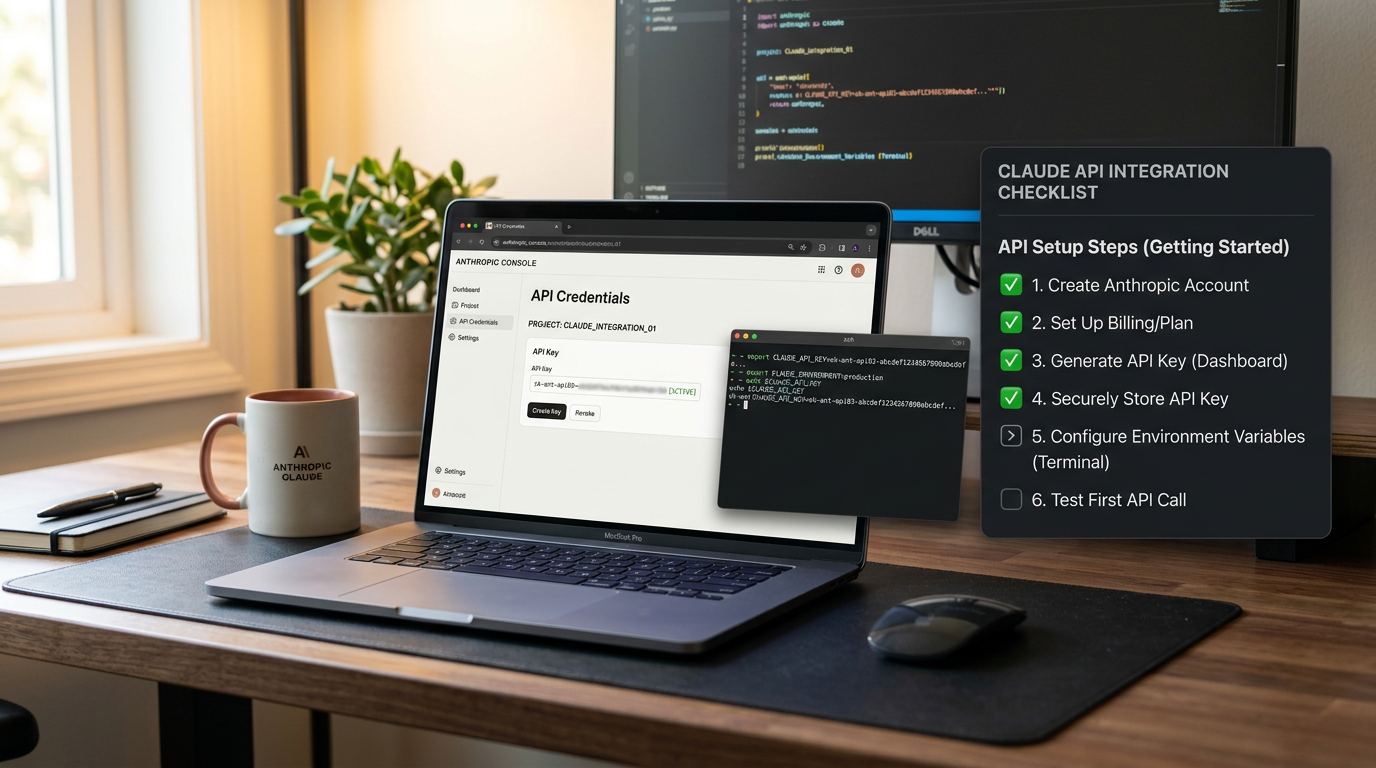
Before you can use Claude code in any form, you need API credentials. Here’s the practical setup:
Setting Up Your API Key
- Create an Anthropic account: Visit the official Anthropic website and sign up if you haven’t already
- Access the console: Navigate to the Anthropic console (the exact URL and process should be confirmed in the official documentation, as these details can change)
- Generate an API key: Look for API keys or credentials section in your account dashboard
- Store it securely: Save your API key somewhere safe—you’ll need it for every integration
Important cost and limit considerations:
- Check the current pricing structure before you start making requests
- Understand whether there’s a free tier or trial credits available
- Be aware of rate limits for your account tier (requests per minute, tokens per minute)
- Set up billing alerts if available to avoid unexpected charges
Because pricing, rate limits, and free tier availability change over time, always verify the current details on the official pricing page before you begin experimenting. As of this guide’s publication in June 2026, you should confirm these specifics directly with Anthropic’s current documentation.
Your First Claude API Integration (Three Approaches)
Let’s walk through three beginner-friendly ways to make your first successful API call to Claude. Choose the approach that matches your comfort level.
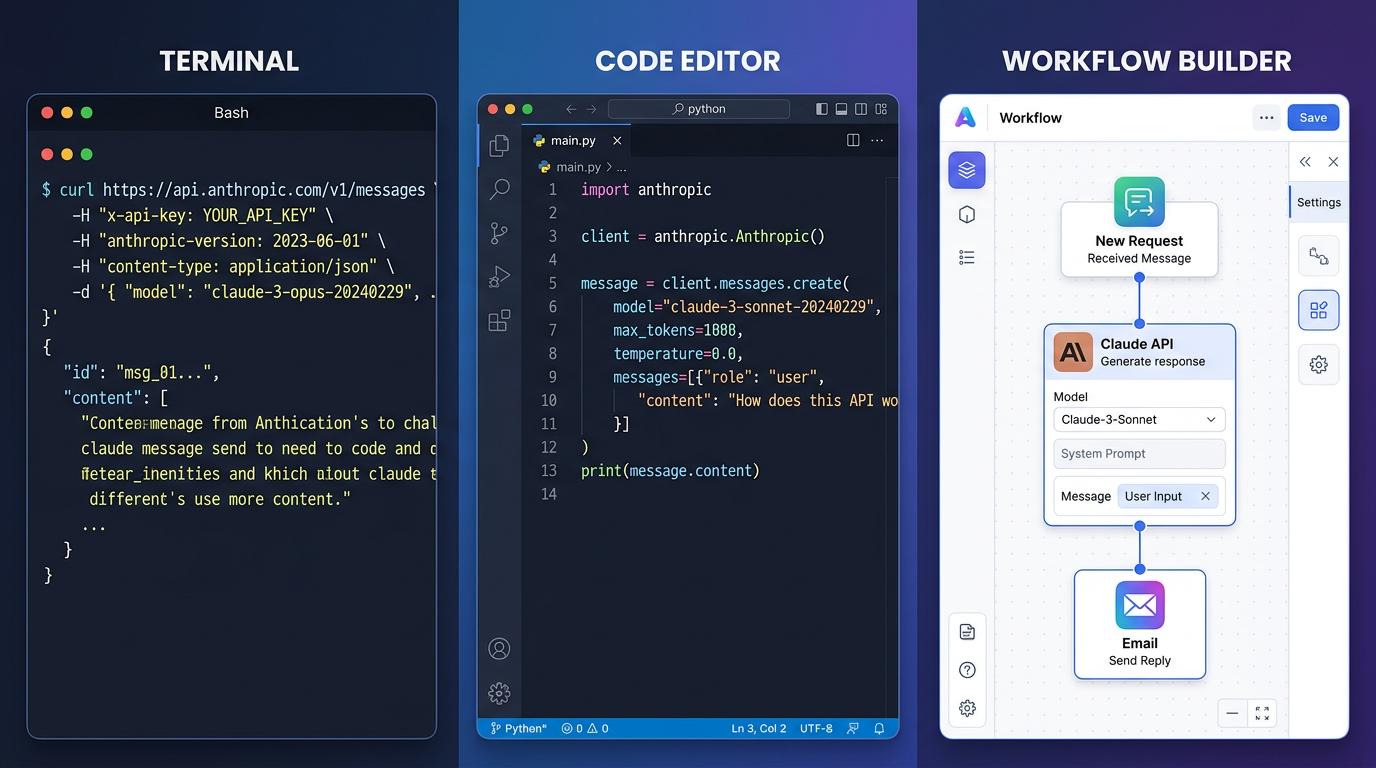
Approach 1: Direct API Call with curl (No Programming Required)
The simplest test is a direct HTTP request. You can run this in your terminal to verify your API access works:
Before running any command, check the official API reference for the current base URL, authentication header format, and required parameters. The basic pattern typically looks like this:
# Verify these details in the current API documentation before running
curl https://api.anthropic.com/v1/messages \
  -H "Content-Type: application/json" \
  -H "x-api-key: YOUR_API_KEY_HERE" \
  -d '{
    "model": "claude-3-sonnet-20240229",
    "messages": [{"role": "user", "content": "Hello, Claude!"}],
    "max_tokens": 100
  }'
What’s happening here:
- We’re sending an HTTP POST request to Claude’s API endpoint
- The authentication header (verify the exact name and format) includes your API key
- We’re specifying which model to use (model names change—confirm current options)
- We’re sending a simple message and limiting the response length
If this works, you’ll get a JSON response with Claude’s reply. If you see errors, check your API key, verify the endpoint URL, and confirm you haven’t hit rate limits.
Approach 2: Python SDK Integration (Beginner Code Path)
If you’re comfortable with basic Python, using the official SDK is cleaner than raw HTTP requests:
Installation:
Before installing, verify the current package name and installation command in the official Python SDK repository:
# Confirm this command in the official SDK documentation
pip install anthropic
Basic working example:
# Verify current import and authentication patterns before using
import anthropic

# Initialize the client with your API key
client = anthropic.Anthropic(
    api_key="YOUR_API_KEY_HERE"
)

# Send a message to Claude
message = client.messages.create(
    model="claude-3-sonnet-20240229",  # Verify current model names
    max_tokens=100,
    messages=[
        {"role": "user", "content": "Explain APIs in one sentence."}
    ]
)

# Print the response
print(message.content)
Why use the SDK instead of curl?
- Cleaner syntax and less boilerplate
- Built-in error handling
- Automatic request formatting
- Better for building longer scripts and applications
Approach 3: No-Code Integration with n8n (Visual Workflow)
For those who prefer visual workflow builders, n8n is a popular open-source automation platform. Before following these steps, verify that n8n has a current Anthropic or Claude integration node:
Basic n8n setup pattern:
- Add credentials: In n8n, create new credentials for Anthropic (if a native node exists) or prepare to use HTTP Request node
- Configure the node: If there’s an official Claude node, select your model and configure authentication
- Set up your prompt: Define what input you’re sending to Claude
- Connect to other nodes: Link Claude to triggers (webhooks, schedules) and actions (send to Slack, save to database)
If n8n doesn’t have a native Claude node at the time you’re reading this, you can still integrate using the HTTP Request node with the same API structure shown in the curl example above.
Claude Code Integration Examples for Beginners
Now that you understand the basic connection methods, let’s look at practical integration patterns you can adapt for real projects.

Example 1: Text Summarization Automation
Use case: Automatically summarize long articles or documents
Python implementation with error handling:
import anthropic
import sys

def summarize_text(text_to_summarize):
    try:
        client = anthropic.Anthropic(
            api_key="YOUR_API_KEY_HERE"
        )

        prompt = f"Please summarize this text in 2-3 sentences:\n\n{text_to_summarize}"

        message = client.messages.create(
            model="claude-3-sonnet-20240229",
            max_tokens=200,
            messages=[{"role": "user", "content": prompt}]
        )

        return message.content[0].text

    except anthropic.APIError as e:
        return f"API Error: {e}"
    except Exception as e:
        return f"Unexpected error: {e}"

# Use it
long_text = "Your long article text here..."
summary = summarize_text(long_text)
print(summary)
What makes this production-ready:
- Try/except blocks catch errors gracefully
- Returns error messages instead of crashing
- Uses clear variable names
- Easy to adapt for batch processing
Example 2: Multi-Service Automation Workflow
Use case: Fetch data from an API, process it with Claude, send results to Slack
Workflow architecture:
1. Trigger (schedule or webhook)
   ↓
2. Fetch data from external API
   ↓
3. Send data to Claude for analysis
   ↓
4. Format Claude's response
   ↓
5. Post to Slack channel
Python sketch showing the Claude integration part:
import anthropic
import requests

def analyze_api_data(data):
    client = anthropic.Anthropic(api_key="YOUR_API_KEY")

    prompt = f"Analyze this data and identify the top 3 insights:\n{data}"

    message = client.messages.create(
        model="claude-3-sonnet-20240229",
        max_tokens=300,
        messages=[{"role": "user", "content": prompt}]
    )

    return message.content[0].text

# Fetch from some API
api_response = requests.get("https://api.example.com/data")
data = api_response.json()

# Process with Claude
insights = analyze_api_data(data)

# Send to Slack (using Slack webhook or API)
slack_webhook = "https://hooks.slack.com/services/YOUR/WEBHOOK/URL"
requests.post(slack_webhook, json={"text": insights})
This pattern works for countless automation scenarios: monitoring dashboards, content moderation, data extraction, customer support routing, and more.
Example 3: Prompt Template Pattern for Consistent Results
When building automation, you want reliable, consistent outputs. Use prompt templates:
def content_moderator(user_input):
    """Check if user content violates policies"""

    template = """Review this user-submitted content for policy violations.

Content: {content}

Check for:
- Spam or promotional content
- Offensive language
- Misinformation
- Off-topic posts

Respond with JSON format:
{{"violation": true/false, "reason": "brief explanation", "severity": "low/medium/high"}}
"""

    prompt = template.format(content=user_input)

    # Make API call with this structured prompt
    # ... (API call code here)

    return result
Why this works:
- Consistent structure means predictable outputs
- Easy to test and debug
- Simple to update the template for all uses at once
- Clear instructions reduce hallucination
Using Claude Code with APIs: Practical Workflow Tips
Here are battle-tested tips for integrating Claude into automation workflows:
Managing Costs and Rate Limits
Before you automate, set boundaries:
- Start with token limits: Always set
max_tokensin your requests to cap costs per call - Implement rate limiting in your code: Add delays between requests if processing batches
- Use smaller models for simple tasks: If you just need basic text processing, check which models are most cost-effective
- Cache repetitive prompts: If you’re sending the same system instructions repeatedly, look for ways to reduce redundant tokens
Simple rate limit handler:
import time

def call_claude_with_rate_limit(prompt, calls_per_minute=10):
    delay = 60 / calls_per_minute

    # Make your API call
    result = make_api_call(prompt)

    # Wait before next call is allowed
    time.sleep(delay)

    return result
Error Handling Best Practices
Always handle these scenarios:
- Authentication errors: Invalid or expired API keys
- Rate limit errors: Too many requests too quickly
- Timeout errors: Network issues or slow responses
- Invalid request errors: Malformed JSON or unsupported parameters
Beginner-friendly error handling pattern:
def safe_claude_call(prompt):
    max_retries = 3
    retry_delay = 2  # seconds

    for attempt in range(max_retries):
        try:
            # Your API call here
            response = client.messages.create(...)
            return response

        except anthropic.RateLimitError:
            if attempt < max_retries - 1:
                time.sleep(retry_delay * (attempt + 1))
            else:
                raise Exception("Rate limit exceeded after retries")

        except anthropic.APIError as e:
            print(f"API error: {e}")
            return None
Testing Without Wasting Credits
Smart testing strategies:
- Use minimal max_tokens during development: Set it to 50-100 while testing
- Test with short, simple prompts first: Verify integration works before sending long documents
- Log requests and responses: Save what you’re sending and receiving so you can debug without re-running
- Use conditional logic: Add flags to skip API calls during certain testing phases
Common Beginner Mistakes and How to Avoid Them
Mistake 1: Hardcoding API Keys in Code
Why it’s bad: If you share your code or push to GitHub, you expose your credentials.
Fix: Use environment variables:
import os
api_key = os.environ.get("ANTHROPIC_API_KEY")
Set the environment variable in your terminal:
export ANTHROPIC_API_KEY="your-key-here"Mistake 2: Not Handling Rate Limits
Why it’s bad: Your automation breaks when you hit limits, and you don’t know why.
Fix: Implement exponential backoff and catch rate limit errors specifically (shown in error handling section above).
Mistake 3: Sending Too Much Context
Why it’s bad: Costs scale with tokens, and long contexts don’t always improve results.
Fix: Trim input intelligently:
def trim_context(text, max_chars=2000):
    if len(text) <= max_chars:
        return text
    return text[:max_chars] + "... [truncated]"

prompt = f"Summarize: {trim_context(long_document)}"
Mistake 4: Ignoring Model Selection
Why it’s bad: Using the most powerful model for simple tasks wastes money.
Fix: Check the current model catalog and choose appropriately. Before finalizing your code, verify which models are available and recommended for beginners. Different models have different capabilities, speeds, and costs.
Mistake 5: No Logging or Monitoring
Why it’s bad: When something breaks in production, you can’t diagnose it.
Fix: Add basic logging:
import logging

logging.basicConfig(level=logging.INFO)
logger = logging.getLogger(__name__)

def call_with_logging(prompt):
    logger.info(f"Sending prompt: {prompt[:100]}...")
    response = make_api_call(prompt)
    logger.info(f"Received response length: {len(response)}")
    return response
Build Claude Code Projects: Beginner Roadmap
Now that you have the basics, here’s a practical learning path:
Immediate Next Steps (This Week)
- Get API access and test your first call: Use the curl or Python examples above
- Build one simple automation: Pick the easiest use case relevant to your work (text summarization, simple Q&A, data extraction)
- Add error handling: Don’t skip this—it’s what separates experiments from real tools
- Monitor your usage: Check how many tokens you’re using per request
Short-Term Goals (Next Month)
- Integrate with one other service: Connect Claude to Slack, Discord, a database, or another API you use
- Create a reusable template: Build a Python class or n8n workflow you can adapt for multiple projects
- Implement proper rate limiting: Make sure your automation won’t break at scale
- Learn prompt engineering basics: Understand how prompt structure affects output quality
Medium-Term Growth (Next 3 Months)
- Build a multi-step workflow: Combine Claude with data fetching, processing, and output delivery
- Explore advanced prompting: System prompts, few-shot examples, structured output formats
- Set up monitoring: Track success rates, error types, and costs over time
- Share your work: Document what you built and help other beginners
Frequently Asked Questions
Do I need to be a programmer to use Claude in automation?
No. While this guide shows code examples, no-code tools like n8n, Make, and Zapier can integrate with Claude’s API through visual interfaces. However, basic understanding of APIs (what they are, how authentication works) helps regardless of the tool you use.
How much does it cost to experiment with Claude code?
This depends on Anthropic’s current pricing structure. Before you start, check the official pricing page for per-token costs and whether free credits are available. A rough estimate: testing with short prompts and small max_tokens settings typically costs pennies per request, but always monitor your usage.
What’s the difference between Claude models, and which should beginners use?
Model names, capabilities, and recommendations change over time. As of June 2026, verify the current model catalog in the official documentation. Generally, there are different models balancing cost, speed, and capability—start with whatever is recommended for general use and scale up only if you need it.
Can I use Claude code with other APIs and services?
Yes, absolutely. That’s the power of API integration. You can chain Claude with any HTTP-based service: fetch data from databases, call weather APIs, interact with Slack, scrape websites (where permitted), and more. The examples in this guide show multi-service patterns.
How do I avoid hitting rate limits?
Implement delays between requests, use exponential backoff on retries, and stay within your account tier’s limits (check the official documentation for current numbers). For high-volume automation, consider upgrading your account tier or batching requests efficiently.
What if my integration breaks after I set it up?
APIs evolve. Model names change, endpoints update, and SDKs release new versions. When building automation, note the versions you’re using, check changelogs periodically, and write code that fails gracefully with clear error messages so you can diagnose issues quickly.
Ready to Start Building?
You now have a practical foundation for using Claude code in beginner automation projects. You understand the difference between API, SDK, and no-code integrations. You’ve seen working code examples with error handling. You know the common pitfalls to avoid.
Your action plan:
- Confirm the latest setup details in the official Claude API documentation
- Get your API credentials and test your first call
- Pick one practical use case from this guide and implement it
- Add error handling and logging from day one
- Monitor your usage and costs as you experiment
Remember, the best way to learn is by building. Start with something simple, make it work, then gradually add complexity. Every automation you build teaches you patterns you can reuse in the next project.
The beginner Claude code guide you’ve just read focused on practical integration and real workflows—not theory. Now go build something useful, iterate based on what you learn, and don’t be afraid to make mistakes in your testing environment. That’s how you become proficient with any new technology.
For continued learning, bookmark the official Anthropic documentation, join developer communities discussing AI automation, and keep experimenting with new integration patterns as you grow more comfortable with the fundamentals covered here.
References
Enjoyed this article?