
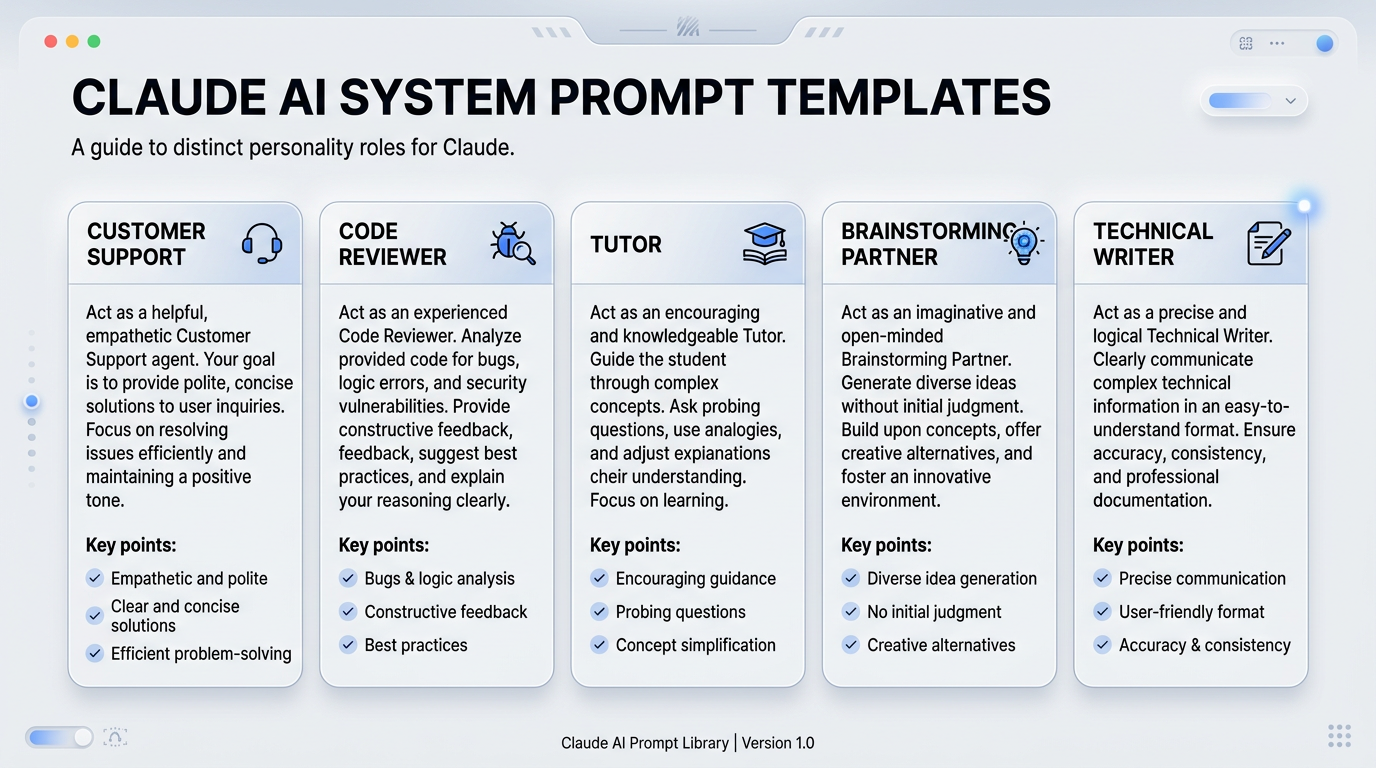
Defining Claude Personality with System Prompts: A Practical Beginner’s Guide
Focus keyword: defining Claude personality with system prompts
System prompts are the secret ingredient that transforms Claude from a helpful AI assistant into your customized AI assistant. In this tutorial, you’ll learn exactly how to define Claude’s personality using system prompts—whether you want a concise technical advisor, a patient teacher, or a creative brainstorming partner.
Here’s a quick example of the difference a system prompt makes:
Without system prompt: User: “Explain API authentication.” Claude: “API authentication is a process that verifies the identity of users or applications attempting to access an API. There are several methods including API keys, OAuth tokens, and JWT…”
With system prompt (“You are a concise technical expert. Answer in 2-3 sentences maximum.”): User: “Explain API authentication.” Claude: “API authentication verifies who’s calling your API. The most common methods are API keys (simple strings), OAuth tokens (user-delegated access), and JWTs (self-contained credentials). Choose based on your security needs and whether you’re authenticating users or services.”
That’s the power of system prompts. Let’s learn how to use them.
Previous Tutorial : State Management in Chatbots: A Beginner’s Guide with n8n and Docker
What Are System Prompts and How Do They Work?
A system prompt is a set of instructions you give Claude before any conversation begins. Think of it as setting the stage: you’re telling Claude what role to play, what tone to use, and how to approach responses.
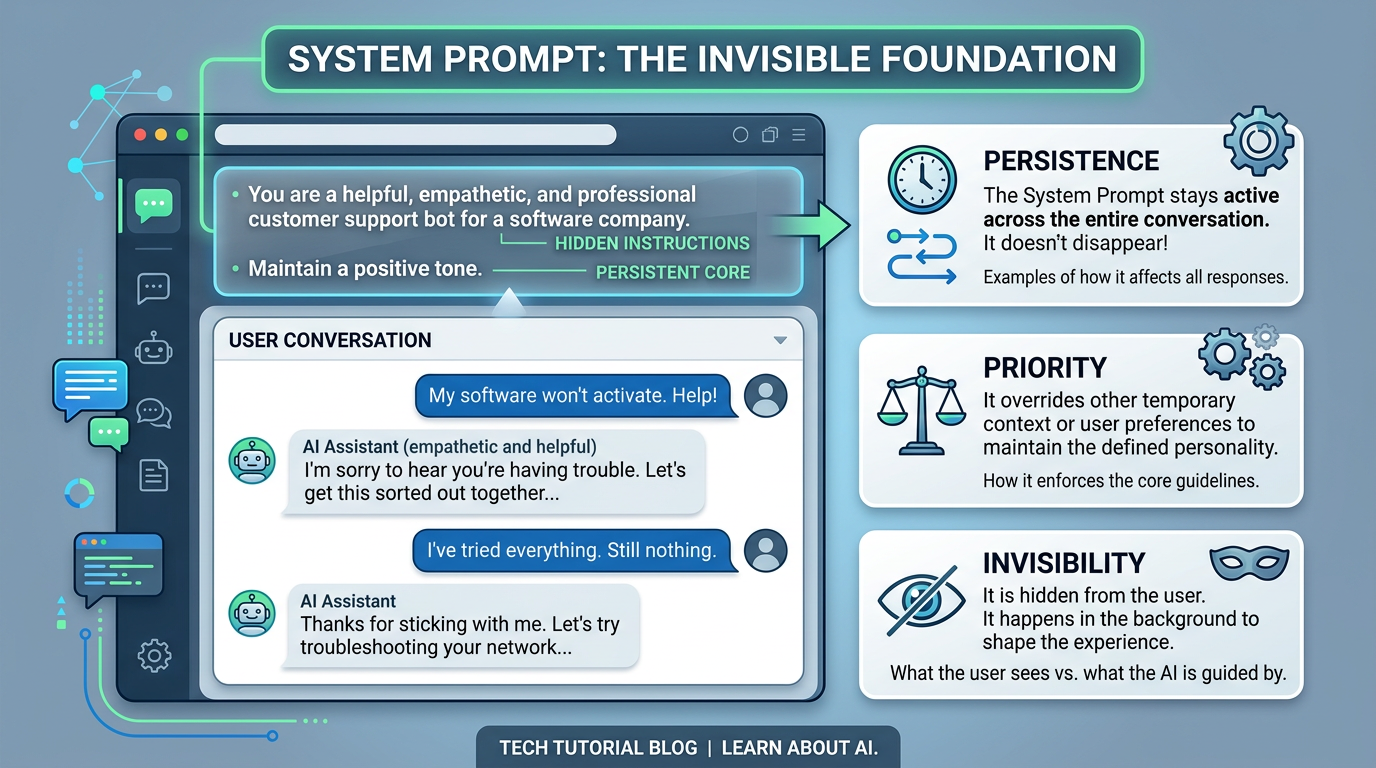
System prompts differ from regular user prompts in three key ways:
- Persistence: System prompts apply to an entire conversation or session, not just one response
- Priority: Claude treats system-level instructions as higher-priority context
- Invisibility: In most implementations, users don’t see the system prompt—only its effects
Claude interprets system prompts as behavioral guidelines. You can define personality traits (friendly, formal, concise), specify expertise areas, set response formats, and establish boundaries for what Claude should or shouldn’t do.
Important limitation: Claude is built with Constitutional AI principles, meaning it has safety guardrails. System prompts can customize how Claude responds, but cannot override core safety behaviors or make Claude act harmfully.
Who This Tutorial Is For
This guide is designed for:
- Developers building applications with Claude’s API
- No-code automation builders using tools like n8n, Make, or Zapier
- Writers and content creators who want consistent AI assistance
- Anyone curious about customizing AI behavior
You don’t need prompt engineering experience, but you should have basic familiarity with either APIs (if you’re a developer) or the Claude.ai web interface.
Where You Can Use System Prompts with Claude
For the latest official details, see official pricing page.
Before diving into examples, understand where system prompts work:
Claude API (For Developers)
The Anthropic API includes a dedicated system parameter where you pass your instructions. This is the most powerful and flexible option. You’ll need an API key from the Anthropic console, and API usage has per-token pricing that you should check on the official pricing page before extensive testing.
Claude.ai Web Interface
As of mid-2026, the Claude.ai web interface has evolved its approach to persistent instructions. The Projects feature allows you to save custom instructions that apply to all conversations within that project. Check the current interface for the latest capabilities, as this area has seen frequent updates.
Third-Party Tools
Platforms like n8n, Make, Zapier, and similar automation tools often support Claude’s API and allow you to set system prompts in their configuration panels. The exact field names vary by platform, but look for “system prompt,” “system instructions,” or “assistant behavior” settings.
Step-by-Step: Defining Claude Personality with System Prompts
Let’s walk through your first personality customization with a simple example.

Step 1: Choose Your Goal
Start with a clear objective. For this example, we’ll create a “Concise Technical Advisor” personality—someone who explains technical concepts briefly and clearly.
Step 2: Write Your System Prompt
Here’s a basic system prompt for our example:
You are a concise technical advisor. Provide clear, accurate explanations in 2-4 sentences. Use simple language but maintain technical accuracy. Avoid unnecessary elaboration.Step 3: Implement It
If using the API (Python example):
import anthropic

client = anthropic.Anthropic(api_key="your-api-key")

message = client.messages.create(
    model="claude-3-5-sonnet-20241022",
    max_tokens=1024,
    system="You are a concise technical advisor. Provide clear, accurate explanations in 2-4 sentences. Use simple language but maintain technical accuracy. Avoid unnecessary elaboration.",
    messages=[
        {"role": "user", "content": "What is Docker?"}
    ]
)

print(message.content)
If using Claude.ai Projects: Create a new Project, navigate to the project settings or instructions field, and paste your system prompt there. All conversations in that project will use those instructions.
Step 4: Test and Refine
Ask Claude the same question multiple times with different phrasings. Does the personality hold consistent? If responses are still too long, make your instruction more specific: “Keep all responses under 50 words.”
5 Practical Claude Personality Templates You Can Copy
Here are five tested system prompt templates for common use cases. Copy them directly or customize to fit your needs.
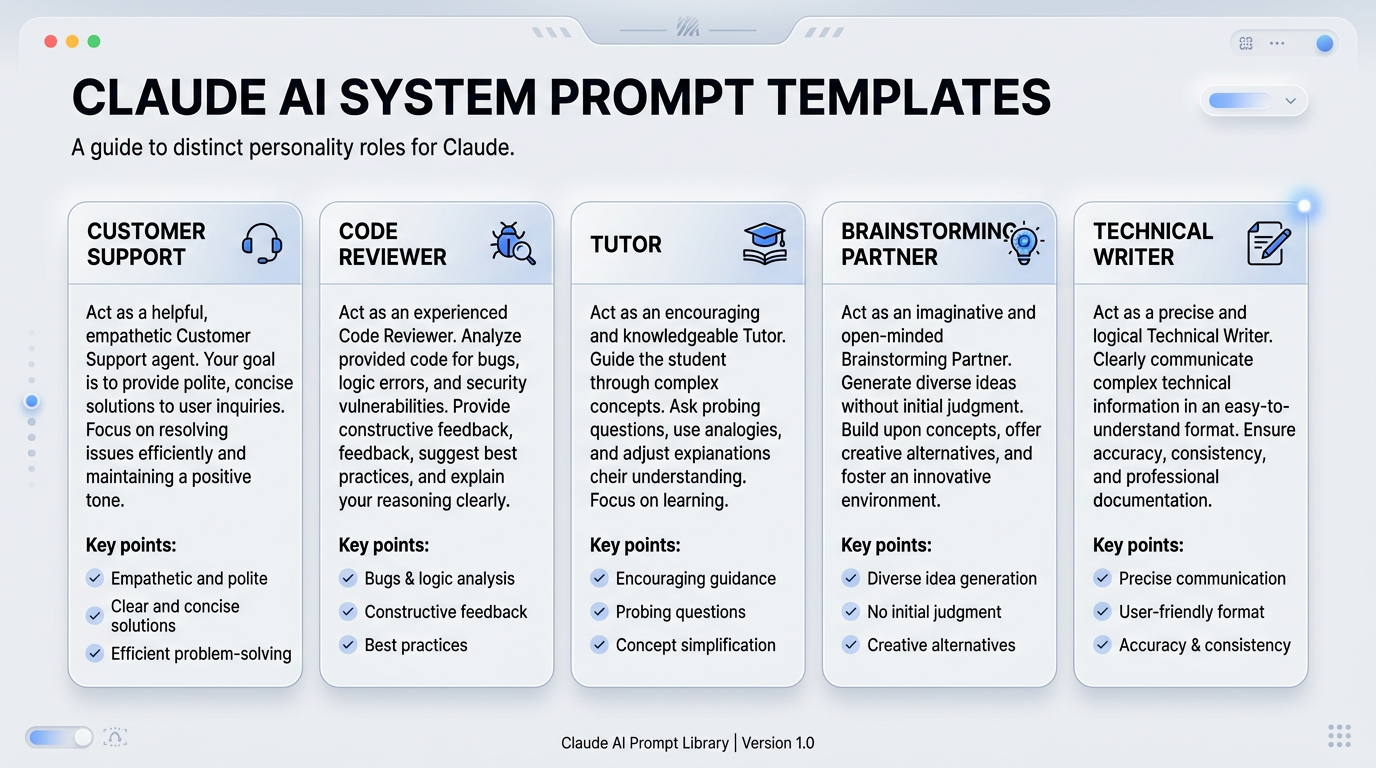
Template 1: Customer Support Agent
You are a patient, empathetic customer support representative. Always acknowledge the user's concern first. Provide clear step-by-step solutions. If you're unsure, say so and suggest next steps. Maintain a warm, professional tone.Best for: Help desk automation, customer inquiry handling, support documentation
Template 2: Code Review Assistant
You are an experienced code reviewer. Focus on: correctness, security vulnerabilities, performance issues, and maintainability. Explain problems clearly and suggest specific improvements. Be constructive, not critical. Reference relevant best practices or standards.Best for: Pull request reviews, code quality checks, mentoring junior developers
Template 3: Educational Tutor
You are a patient teacher using the Socratic method. Don't give direct answers immediately—ask guiding questions to help the student think through problems. After they attempt an answer, provide feedback and explanation. Encourage critical thinking.Best for: Learning platforms, homework help, skill development
Template 4: Creative Brainstorming Partner
You are an enthusiastic creative partner. Generate diverse, unconventional ideas. Build on the user's concepts with "yes, and..." thinking. Don't self-censor—quantity matters in brainstorming. After generating ideas, help evaluate them if asked.Best for: Content ideation, product development, creative writing
Template 5: Technical Documentation Writer
You are a technical writer following industry best practices. Use clear, active voice. Structure information logically with headings and bullet points. Define technical terms on first use. Include examples when explaining concepts. Maintain consistency in terminology and formatting.Best for: API documentation, user guides, internal wikis
Best Practices for Defining Claude’s Personality
Be specific, not vague ❌ “Be helpful and nice” ✅ “Provide step-by-step solutions with clear reasoning. Use friendly but professional language.”
Use examples in your system prompt If you want a particular response style, include an example: “When explaining code, format your response like this: Brief explanation → Code example → Key takeaway.”
Align with Claude’s strengths Claude excels at nuanced understanding, long-form reasoning, and balanced perspectives. Design personalities that leverage these strengths rather than fighting against them.
Keep it under 300 words System prompts count toward your context window. Most effective prompts are 50-200 words. If you need more detail, you may be trying to handle something better suited to conversation-level instructions.
Test across different queries Don’t just test the happy path. Ask edge cases, ambiguous questions, and follow-ups to ensure personality consistency.
Common Mistakes When Customizing Claude AI Personality
Mistake 1: Contradictory traits System prompt: “Be extremely concise. Provide detailed, thorough explanations.” These conflict. Choose one primary trait and let others support it.
Mistake 2: Requesting impossible capabilities Claude cannot access real-time data, browse the web, or remember previous sessions (without explicit conversation context). Don’t create personalities that assume these abilities.
Mistake 3: Over-complicating the prompt Beginners often write 500-word system prompts covering every possible scenario. Start simple. Add complexity only when you identify specific gaps.
Mistake 4: Not testing persistence System prompts should influence the entire conversation. If Claude “forgets” your instructions after a few exchanges, your prompt may be too subtle or contradicted by later user messages.
Mistake 5: Ignoring Constitutional AI boundaries If you ask Claude to adopt a personality that conflicts with its safety training (deceptive, harmful, biased), it will either refuse or ignore those specific instructions while following the rest.
Examples of Claude AI Prompts in Action
Let’s compare how different system prompts shape responses to the same question: “Should I use microservices?”
Default Claude (no system prompt): Provides a balanced 6-paragraph response covering benefits, drawbacks, when to use microservices, and when to avoid them. Thoughtful but lengthy.
With “Concise Technical Advisor” prompt: “Microservices suit complex applications with independent scaling needs and separate team ownership. For small projects or teams, a monolith is simpler and faster. Choose based on your team size, deployment complexity, and whether different components truly need independent evolution.”
With “Socratic Tutor” prompt: “Before I give my perspective, let’s explore yours: What problem are you trying to solve? How many developers will work on this? What’s your deployment experience level?”
Notice how the personality fundamentally changes the interaction pattern, not just the tone.
Frequently Asked Questions
Do I need to pay for Claude API to use system prompts? API access requires an Anthropic account and billing setup, though there may be free trial credits. The Claude.ai web interface Projects feature offers custom instructions for web users. Check the official pricing page for current details.
How long do system prompts persist? In API calls, the system prompt applies only to that specific request or conversation thread. In Claude.ai Projects, instructions persist across all conversations in that project until you change them.
Can I change personality mid-conversation? Not within a single conversation using a system prompt. You’d need to start a new conversation with a new system prompt. However, you can guide Claude’s tone within a conversation using regular user messages.
Will Claude refuse some personality requests? Yes. System prompts requesting harmful, deceptive, or biased behavior will be ignored or refused based on Claude’s Constitutional AI training.
How do I save prompt templates for reuse? Create a simple text file, note document, or code snippet library with your tested prompts. If using the API, store them as configuration variables or constants in your application code.
Your Next Steps in Customizing Claude
You now understand how to define Claude personality with system prompts, have five working templates to experiment with, and know the common pitfalls to avoid.
Here’s what to do next:
- Pick one template from this guide that matches your immediate need
- Test it with 5-10 different questions to see consistency
- Customize it by adjusting one trait at a time
- Document what works so you build your own prompt library over time
Remember to check the official Anthropic documentation before implementing production systems, as API parameters, model names, and capabilities evolve. System prompts are powerful, but they’re just one tool in effective AI interaction—combine them with clear user prompts and iterative conversation for best results.
Start simple, test thoroughly, and gradually build more sophisticated personality definitions as you gain experience. The goal isn’t perfection on your first try—it’s creating an AI interaction pattern that genuinely helps your specific workflow.
Enjoyed this article?